Home › Minecraft › All Minecraft Default Skins: Steve, Alex and the Seven New Faces
All Minecraft Default Skins: Steve, Alex and the Seven New Faces
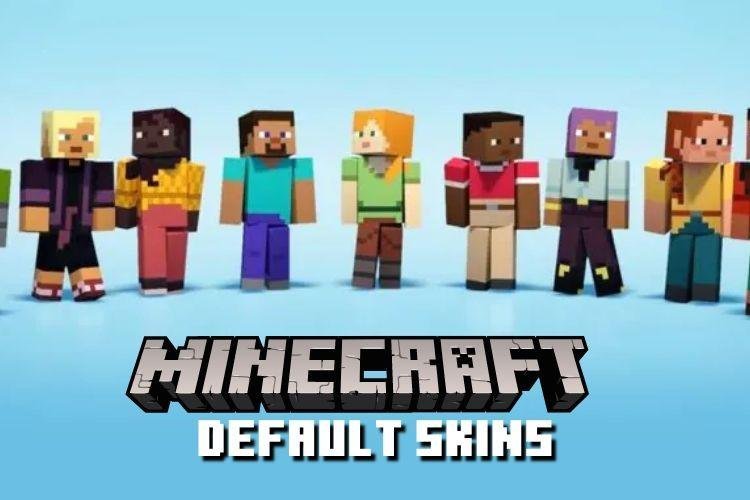
For most of Minecraft's life, a new player looked like Steve, or later, Alex — which made busy servers a sea of identical faces. That changed in October 2022, when Mojang added seven new default skins alongside the classics. There are now nine built-in characters, and every player gets one assigned at random until they choose their own.
All Nine Default Skins
| Skin | Arrived | The Look |
|---|---|---|
| Steve | 2011 | Sky-blue shirt, jeans, short dark hair and a goatee |
| Alex | 2014 | Orange ponytail, green eyes, green shirt, brown trousers, grey boots |
| Noor | 2022 | Short brown hair, red jacket over a black shirt, teal pants |
| Sunny | 2022 | Short dark hair, green rolled-sleeve shirt, one-strap jeans, grey prosthetic arm |
| Ari | 2022 | Brown ponytail, pink-cheeked smile, yellow top and jeans |
| Zuri | 2022 | Short black hair, bright red shirt, khaki pants with a brown belt |
| Makena | 2022 | Long dark brown hair, yellow shirt, red cuffed pants |
| Kai | 2022 | Blonde hair and beard tied with a purple band, purple robe and trousers |
| Efe | 2022 | Purple hair and eyes, sea-green shirt, gold belt, bracelet and earrings |
The Two Classics
Steve is the original protagonist from the game's 2011 launch, deliberately without an official backstory so players can project their own. That blank space even spawned the Herobrine legend — the white-eyed Steve lookalike who supposedly haunted old worlds. Alex followed in 2014 as a second default, and both skins became famous enough to appear in other games, including Super Smash Bros. Ultimate. From Alex onwards, the game assigned default skins randomly rather than by any player setting, a system the new skins kept.
The Seven New Faces
The 2022 additions, revealed at Minecraft Live, are built around variety in hairstyle, clothing and skin tone. Details reward a close look: Noor's name means "light" in Urdu, Sunny has a prosthetic arm as part of their design, Kai's purple palette mirrors a Nether portal, and Efe is the most decorated of the set, with gold in the belt buckle, bracelet, earrings and shoes. Ari's belt matches their ponytail; Zuri keeps things subtle with a single bold red shirt; Makena's hair, eyes and warm colour scheme are coordinated head to toe.
How to Choose Yours
You are never stuck with the skin the game hands you. On Java, skins are changed through the Minecraft Launcher's Skins tab, where the defaults sit alongside any custom skins you add. On Bedrock, open the Dressing Room from the main menu and pick a character. The defaults are free, always available, and a good middle ground for players who want an identity without downloading or designing a custom skin.
Two Body Shapes, Too
The defaults also come in two builds. The classic model, used by Steve, Noor, Zuri, Makena and Kai, has wider four-pixel arms, while the slim model, used by Alex, Sunny, Ari and Efe, has narrower three-pixel arms — a difference you can spot at once in short sleeves. Custom skins make the same choice, so if a favourite character's arms ever look wrong, you have probably been switched to the other build, and picking a different default fixes it.
Frequently asked questions
How many default skins does Minecraft have?
Nine: Steve and Alex, plus Noor, Sunny, Ari, Zuri, Makena, Kai and Efe, who were added in October 2022.
When were the new default skins added?
The seven newer skins were unveiled at Minecraft Live 2022 and added that October, more than a decade after the game's launch.
How do you change your default skin?
On Java, use the Skins tab in the Minecraft Launcher. On Bedrock, use the Dressing Room on the main menu. Both let you pick any of the nine defaults for free.
Why did the game give me a random character?
Minecraft assigns a default skin randomly to accounts that have not chosen one. You can swap it at any time in the launcher or Dressing Room.
More Minecraft guides
 Sea Pickles in Minecraft: How to Get, Farm and Use ThemUpdated 12 November 2026
 What Does Smite Do in Minecraft? Smite Enchantment GuideUpdated 12 November 2026
 How to Turn On Vibrant Visuals in MinecraftUpdated 12 November 2026
 What Do Horses Eat in Minecraft? Every Food and Its EffectsUpdated 12 November 2026
 All Wolf Variants in Minecraft and Where to Find ThemUpdated 12 November 2026