Home › Minecraft › How to Turn On Vibrant Visuals in Minecraft
How to Turn On Vibrant Visuals in Minecraft
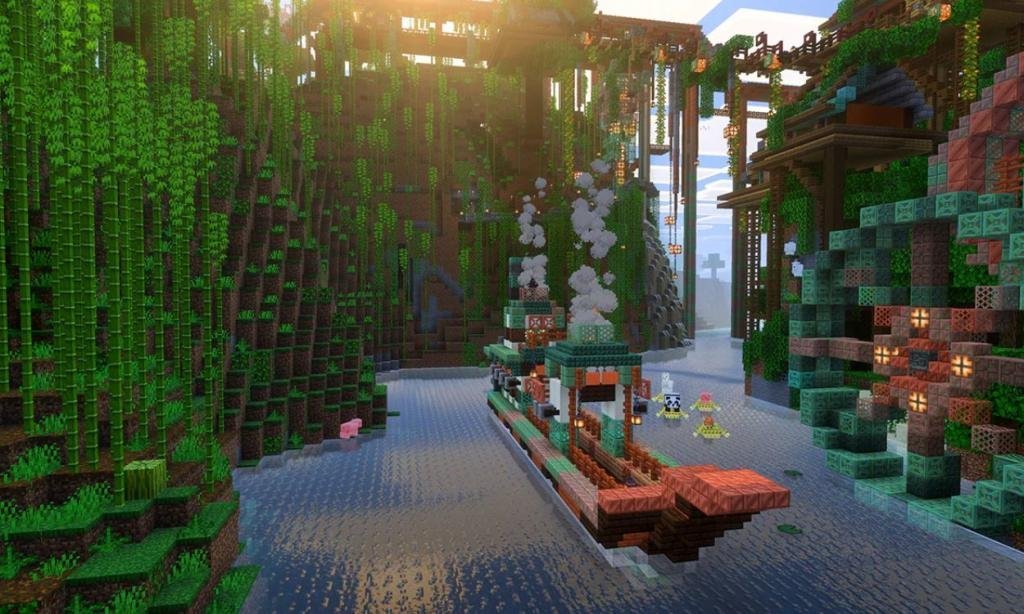
Java players have bragged about shaders for a decade. Vibrant Visuals is Mojang's answer for Bedrock: an official graphics mode, built into the game, that gives the vanilla world proper light and shadow without a single mod. It shipped with the Chase the Skies update and turned the graphics question on Bedrock from which pack do I install into a settings toggle. Here is how to switch it on and what to expect.
How to Turn On Vibrant Visuals
- Launch Minecraft Bedrock and either create a new world or open the settings of an existing one.
- Find the Experiments section in the world settings.
- Toggle Vibrant Visuals on under Graphics, and confirm if the game asks about enabling experiments.
- Load into the world. The lighting should change the moment you spawn in.
If the world looks unchanged, force the issue from inside the game: open Settings from the pause menu, go to the Video tab, scroll to the Graphics Mode option and switch it to Fancy. Some devices default to Simple graphics, which holds the new look back until you overrule it.
What Actually Changes
The difference is easiest to feel at sunrise. Light becomes directional, so the sun casts real shadows that stretch across the landscape and move through the day. Surfaces gain depth: water reflects the sky and shoreline instead of sitting flat, clouds and fog soften the distance, and hills read as three-dimensional from much further away.
Details pop on mobs, too. Eyes can now glow in the dark, and a spider's red stare in a cave mouth is genuinely unsettling the first time. Nothing about the world's shape changes; it is the same blocks, lit like a different game.
Good to Know Before You Flip the Switch
- It is backwards compatible. Vibrant Visuals renders on your machine only, so it works in any world or server.
- Nobody else needs it. You can play alongside friends who have it off; each player sees the game through their own settings.
- Gameplay is untouched. Mob spawning, redstone behaviour and mechanics run exactly as they do in vanilla. Only the rendering changes.
- Performance scales with your device. Stronger hardware holds the fancy lighting best; if frames dip, the Video settings are where you trade prettiness for smoothness.
For Bedrock players who envied Java shader screenshots, this is the moment the gap closed. Five minutes in the settings, The best first use is a tour of your own history. Load your oldest world, wait for sunset, and walk your first base, your harbour, your mountain bridge. Builds you have looked at a thousand times genuinely read differently under directional light: shadows give towers their height back, and harbours double themselves in the reflection. It is also, not coincidentally, a screenshot machine. If the look ever stops suiting you, nothing is permanent. The same toggle turns it off instantly, no world data is rewritten, and your saves carry on untouched either way. Five minutes in the settings, and the world you already built looks like the sequel.
Frequently asked questions
Is Vibrant Visuals available on Java Edition?
No. Vibrant Visuals is a Bedrock Edition feature built by Mojang. Java players continue to use shader mods such as Iris for a similar effect.
Does Vibrant Visuals change gameplay?
No. It only changes rendering: lighting, shadows, reflections and fog. Mob spawning, redstone and all mechanics behave exactly as in vanilla Minecraft.
Can friends without Vibrant Visuals join my world?
Yes. The feature renders locally on each device, so players with it on and off can share a server or world with no conflicts.
I turned it on but nothing looks different. What is wrong?
Your Graphics Mode is probably set to Simple. Open Settings, go to the Video tab, find Graphics Mode and switch it to Fancy to force the enhanced visuals on.
More Minecraft guides
 Respiration Enchantment in Minecraft: Breathe Longer UnderwaterUpdated 12 November 2026
 Sea Pickles in Minecraft: How to Get, Farm and Use ThemUpdated 12 November 2026
 What Does Smite Do in Minecraft? Smite Enchantment GuideUpdated 12 November 2026
 What Do Horses Eat in Minecraft? Every Food and Its EffectsUpdated 12 November 2026
 All Wolf Variants in Minecraft and Where to Find ThemUpdated 12 November 2026