Home › Minecraft › Minecraft Color Codes and Formatting Codes: The Complete List
Minecraft Color Codes and Formatting Codes: The Complete List
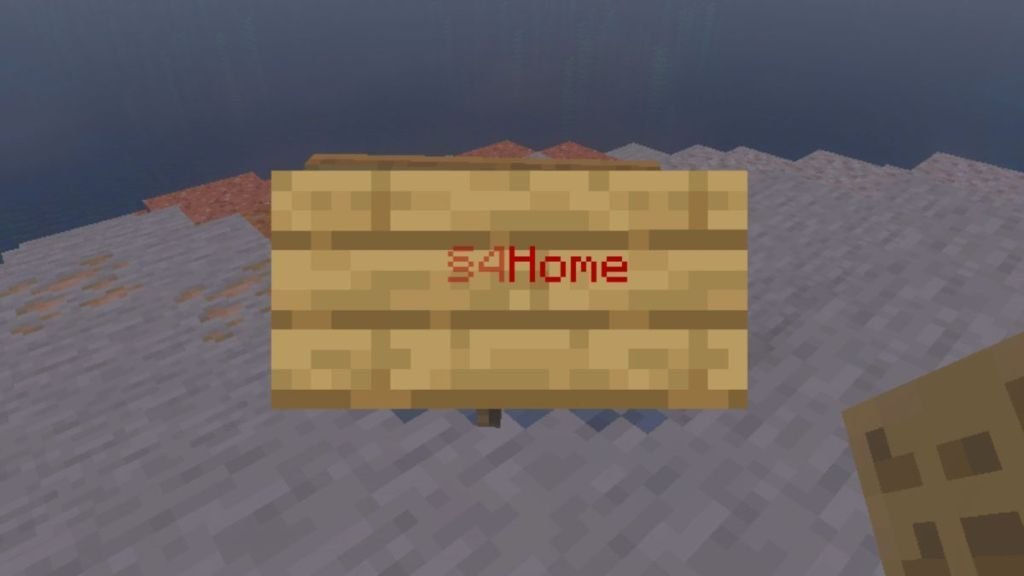
Plain white text is fine for a warning sign. It is less fine for a shop district, a server welcome message or a treasure map title you want people to actually notice. Minecraft has a built-in set of color and formatting codes that let you recolor and restyle almost any text in the game — signs, books, chat, item names and server messages — using one symbol: §, the section sign, followed by a single character.
All Minecraft Color Codes
| Color | Code | Hex | Color | Code | Hex |
|---|---|---|---|---|---|
| Black | §0 | 000000 | Dark gray | §8 | 555555 |
| Dark blue | §1 | 0000AA | Blue | §9 | 5555FF |
| Dark green | §2 | 00AA00 | Green | §a | 55FF55 |
| Dark aqua | §3 | 00AAAA | Aqua | §b | 55FFFF |
| Dark red | §4 | AA0000 | Red | §c | FF5555 |
| Dark purple | §5 | AA00AA | Light purple | §d | FF55FF |
| Gold | §6 | FFAA00 | Yellow | §e | FFFF55 |
| Gray | §7 | AAAAAA | White | §f | FFFFFF |
Bedrock edition gets a handful of exclusive extras, including Minecoin gold (§g) and a set of material colors such as material quartz (§h), material iron (§i) and material diamond (§s), added so resource packs and add-ons can match text to in-game materials.
All Minecraft Formatting Codes
| Format | Code | Effect |
|---|---|---|
| Obfuscated | §k | Text scrambles into constantly changing random characters |
| Bold | §l | Makes the text bold |
| Strikethrough | §m | Draws a line through the text (Java only) |
| Underline | §n | Underlines the text (Java only) |
| Italic | §o | Makes the text italic |
| Reset | §r | Returns everything after it to plain default text |
Codes stack. Typing §1§lHome on a sign gives you bold dark-blue text reading "Home", and you can change color mid-sentence simply by inserting a new code where the change should happen.
How to Use the Codes
The pattern is always the same: § + character, then your text. On Bedrock you can type codes directly into chat, sign text, book titles, world names and renamed items almost everywhere. Java is more restricted in-game — signs and books accept the codes, but chat and world names generally do not unless a server or mod allows it; Java players mainly use the codes in server files and datapacks.
For a server's MOTD — the message shown in the multiplayer server list — Java uses the escaped form of the same codes, written as \u00A7 followed by the character, in the server.properties file. So \u00A72 produces the same dark green as §2.
Java vs Bedrock Differences Worth Knowing
- Formatting survival: On Bedrock, bold and italic stay active when you add a new color code. On Java, a new color code cancels any formatting before it, so you must re-apply §l or §o after every color change.
- Exclusive formats: Strikethrough (§m) and underline (§n) exist only on Java.
- Exclusive colors: Minecoin gold and the material colors exist only on Bedrock.
- Where they work: Bedrock accepts codes in far more places in-game, including world names; Java keeps most usage to signs, books and configuration files.
How to Type the § Symbol
- Windows: Hold Alt and type 21 on the numeric keypad, or find § in the Character Map app and copy it.
- Mac: Press Option + 6.
- Android: On most keyboards, open the symbols page, then press and hold the ¶ key until § appears.
- iPhone/iPad: Switch to the symbols keyboard, where § has its own key; on the numbers page it also hides above the % key — swipe down on it.
Once the symbol stops being a hurdle, colored signs and styled book pages become one of the cheapest ways to make a base or a server feel finished.
Frequently asked questions
How do you type the § symbol for Minecraft color codes?
On Windows, hold Alt and press 21 on the numeric keypad (or copy it from Character Map). On Mac, press Option + 6. On phones, look in the symbols keyboard — on Android it hides behind a long-press of the ¶ key.
What is the Minecraft code for red text?
§c gives you bright red text, while §4 is dark red. Type the code immediately before the text you want colored.
Why does my bold text stop being bold after a color change?
That is Java edition behaviour: applying a new color code resets formatting. Re-apply the formatting code (for example §l for bold) after the color code. Bedrock does not have this issue.
What code resets Minecraft text formatting?
§r. Everything typed after it returns to the default color and style, which is useful at the end of a styled line or sign.
More Minecraft guides
 Woodland Mansion in Minecraft: How to Find and Loot OneUpdated 12 November 2026
 Mineshafts in Minecraft: Loot, Cave Spiders and How to Find OneUpdated 12 November 2026
 Redstone Components in Minecraft: A Complete GuideUpdated 12 November 2026
 What Does Smite Do in Minecraft? Smite Enchantment GuideUpdated 12 November 2026
 All Wolf Variants in Minecraft and Where to Find ThemUpdated 12 November 2026