Home › Minecraft › How to Use a Minecraft Seed Map (Chunkbase Guide)
How to Use a Minecraft Seed Map (Chunkbase Guide)
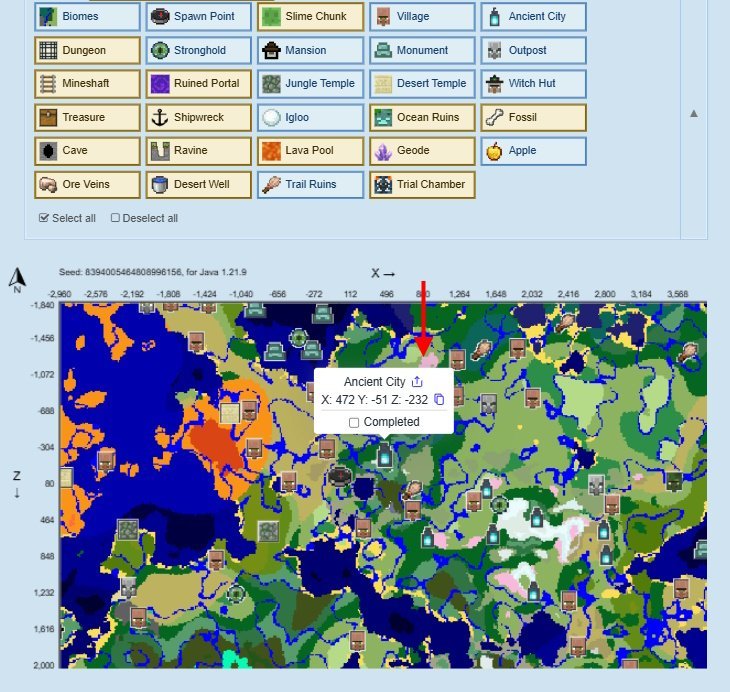
Everyone has done it: two hours of walking in one direction hunting for a woodland mansion that might not even exist. A seed map ends that forever. Tools like the Chunkbase Seed Map take your world's seed code and render the whole world — biomes, terrain and structures — so you can plan trips with exact coordinates before you take a single step.
Step 1: Find Your World Seed Code
Everything starts with the seed. On Java Edition, open chat and type /seed — the game prints your world seed, and clicking it copies it. On Bedrock Edition, go to edit your world and look under the game settings, where the seed code is listed. The same seed always generates the same world, which is exactly why the tool works: it runs the same generation maths outside the game.
Step 2: Use the Seed Map
- Enter the seed, version and dimension. Paste your seed code into the Seed Map app on Chunkbase, then select your edition (Java or Bedrock), the exact game version, and the dimension you want to view — Overworld, Nether or End.
- Choose what to display. Below the seed box is a row of icons for structures and terrain features. Expand it to see every option with its name, and enable only the ones you are hunting — mansions, ancient cities, villages, trial chambers and so on.
- Explore the map. Zoom and pan around the rendered world. Hovering shows the biome name and the coordinates under your cursor; clicking a structure icon reveals and copies its exact coordinates.
- Fine-tune the view. Under the map you can highlight specific biomes, jump to custom coordinates, switch between surface, underground and bottom layers, and turn terrain shading and grid lines on or off.
What the Seed Map Can Show You
- The layout, size and coordinates of surface and underground biomes
- Coordinates for any structure, from ocean monuments to end cities
- Terrain features like amethyst geodes, slime chunks, giant ore veins and lava pools
- Your position relative to your base — paste in your current coordinates and plot the way home
- Whether terrain is flat, jagged or mountainous before you commit to a building site
Java Seeds vs Bedrock Seeds
The two editions handle seeds differently. Java seeds are 64-bit, spanning roughly -4,294,967,295 to 4,294,967,296, while Bedrock seeds are 32-bit, from about -2,147,483,647 to 2,147,483,648. The useful consequence: every Bedrock seed can be reproduced in Java — positive Bedrock seeds work as-is, and negative ones produce the same Java world if you add 4,294,967,296. The reverse is not true; most Java seeds fall outside Bedrock's range entirely. Always match the version in the tool to the version that generated your world, or structures will sit in the wrong places.
A Few Seeds Worth Trying in the Tool
| Seed | Why Try It | Spawn Area |
|---|---|---|
| 6942710633571786 | Meadow ringed by snow-capped hills, with a cherry grove valley nearby | Meadow |
| -8835771403880819269 | A massive lush cave system | Plains |
| 712262452098460 | Two villages on a lake | Plains |
| 3477968804511828743 | A hardcore woodland mansion start | Dark Forest |
| 5154957738255504112 | Bastion and Nether fortress close together | Taiga |
Some players consider a seed map a mild form of cheating, and in a shared survival world that is a fair debate. In your own single-player world, though, it is simply a planning tool — and the hours it saves can go back into building.
Frequently asked questions
What is the Minecraft Seed Map tool?
It is an online tool, most popularly on Chunkbase, that renders your world from its seed code. It shows biomes and structure locations with coordinates for the Overworld, the Nether and the End.
How do I find my world seed?
On Java, type /seed in chat. On Bedrock, edit your world and check the game settings, where the seed code is displayed.
How do Minecraft seeds work?
A seed is the code the game uses to generate a world. Anyone using the same seed and version gets the same terrain, biomes and structures, which is why a seed map can predict your world exactly.
Does the seed map work for both Java and Bedrock?
Yes, but you must select the right edition and version in the tool. Java uses 64-bit seeds and Bedrock uses 32-bit seeds, and structure positions differ between editions even on the same seed.
More Minecraft guides
 Sea Pickles in Minecraft: How to Get, Farm and Use ThemUpdated 12 November 2026
 What Does Smite Do in Minecraft? Smite Enchantment GuideUpdated 12 November 2026
 How to Turn On Vibrant Visuals in MinecraftUpdated 12 November 2026
 What Do Horses Eat in Minecraft? Every Food and Its EffectsUpdated 12 November 2026
 All Wolf Variants in Minecraft and Where to Find ThemUpdated 12 November 2026