Home › Minecraft › How to Use the Fill Command in Minecraft: replace, hollow, outline and More
How to Use the Fill Command in Minecraft: replace, hollow, outline and More
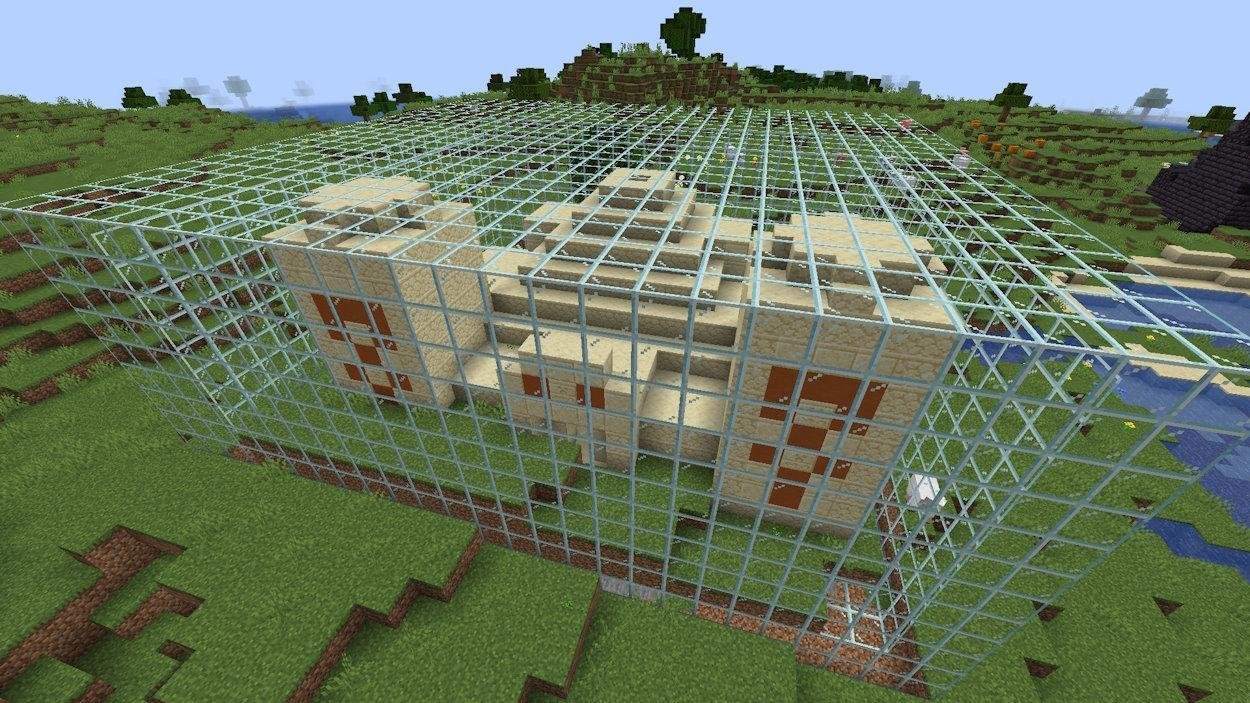
Placing blocks one at a time is charming for a cottage and miserable for a castle wall. The /fill command exists for the second case: it fills a whole cuboid region with a block of your choice in a single line, and with the right keyword it can also clear land, swap one block for another, or raise hollow buildings with interiors ready to decorate.
The Basic Command
Fill works between two opposite corners of an imaginary box. Walk to one corner of your building site and note its coordinates (F3 on Java, or Show Coordinates in Bedrock settings), then walk to the diagonally opposite corner and note those too. The syntax is:
/fill x1 y1 z1 x2 y2 z2 block
For example, /fill 1380 65 -5193 1389 74 -5202 minecraft:diamond_block creates a solid 10 by 10 by 10 cube of diamond blocks. As you type, the game suggests block names, so typos are rare. One command can place up to 32,768 blocks, which is the ceiling that stops you filling a continent by accident.
Filling Without Running Between Corners
The tilde symbol ~ means "relative to me". Stand where your structure should start and use offsets instead of absolute numbers:
/fill ~ ~ ~ ~10 ~20 ~5 oak_planks
That builds a box 10 blocks along, 20 up and 5 deep from your feet. Negative offsets work too, so ~ ~-10 ~ is ten blocks below you. Most quick building in creative mode happens this way.
The Five Modifiers
| Keyword | What It Does |
|---|---|
| replace | Only swaps one chosen existing block for the new one; everything else stays |
| destroy | Fills the area and drops every removed block as an item, like mining it |
| hollow | Builds only the outer shell and clears the inside to air |
| outline | Builds the outer shell but leaves the existing interior untouched |
| keep | Only places blocks where there is currently air, never overwriting anything |
The syntax just appends the keyword: /fill x1 y1 z1 x2 y2 z2 glass hollow gives you a hollow glass room with the inside emptied. For replace, name the block to swap out after the keyword, such as ... stone replace dirt. On Bedrock, add a 1 before the keyword, for example /fill x1 y1 z1 x2 y2 z2 block 1 outline.
Clearing Land
The fastest way to flatten a site is to fill it with air: /fill x1 y1 z1 x2 y2 z2 air. Combined with replace, you can also strip a single material, turning every dirt block in a hillside to air while leaving the stone skeleton standing.
Things to Know Before You Fill
- Fill only makes cuboids and straight lines, never curves. Spheres still need hand work or other tools.
- It cannot place blocks in the void or beyond the world border.
- Gravity blocks placed mid-air fall, and filled water or lava flows normally afterwards.
- There is no undo. A mistyped coordinate can delete hours of work, which is why keep is your best friend near finished builds, and why backing up the world first is genuinely wise.
- Very large fills can freeze or crash a weak machine for a few seconds. Split giant jobs into layers.
Start small: fill a platform, hollow out a cube house, replace the floor. Ten minutes of experiments teaches the command better than any list, and once it clicks, you will wonder how you ever built without it.
Frequently asked questions
Can you undo a fill command in Minecraft?
No, there is no undo. Use the keep modifier near important builds and back up your world before large fills.
What is the command to clear a large area in Minecraft?
Fill the region with air: /fill x1 y1 z1 x2 y2 z2 air, using the two corner coordinates of the area.
How many blocks can one fill command place?
Up to 32,768 blocks per command. Bigger structures need several commands stacked or layered.
What is the difference between hollow and outline?
Both build only the shell. Hollow clears the inside to air, while outline leaves whatever is already inside completely untouched.
More Minecraft guides
 Redstone Components in Minecraft: A Complete GuideUpdated 12 November 2026
 Respiration Enchantment in Minecraft: Breathe Longer UnderwaterUpdated 12 November 2026
 What Does Smite Do in Minecraft? Smite Enchantment GuideUpdated 12 November 2026
 What Do Horses Eat in Minecraft? Every Food and Its EffectsUpdated 12 November 2026
 All Wolf Variants in Minecraft and Where to Find ThemUpdated 12 November 2026