Home › Minecraft › How to Make a Redstone Repeater in Minecraft
How to Make a Redstone Repeater in Minecraft
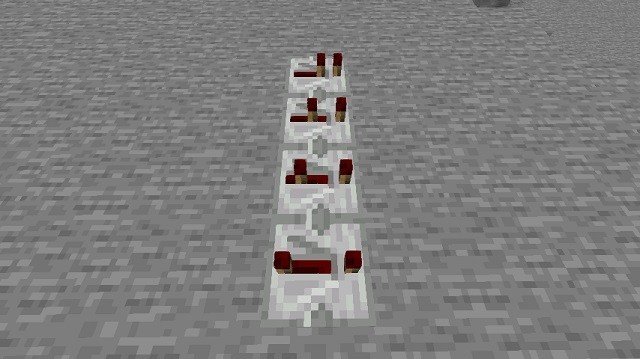
Redstone dust carries a signal for fifteen blocks and then gives up. The repeater is the component that fixes that, and it quietly does three other jobs at the same time: it delays signals, forces them to travel one way, and can freeze a circuit in place. Almost every farm, clock and automatic door you will ever build leans on it.
What a Redstone Repeater Actually Does
- Boosts signals: whatever strength comes in, a full-strength signal of 15 comes out, so long chains of repeaters can carry power across any distance.
- Adds delay: right-clicking a placed repeater moves its rear torch and cycles the delay through 0.1, 0.2, 0.3 and 0.4 seconds. Chain several together for longer pauses.
- Enforces direction: the signal only flows the way the repeater faces, shown by its arrow. Signals cannot leak backwards, which keeps separate parts of a machine from interfering with each other.
- Locks: power a repeater from the side with another repeater or a comparator and it locks, holding its current on or off state no matter what its input does. This is the foundation of memory circuits.
Repeaters also generate naturally in a couple of places — jungle temples hide them in their puzzle corridors and ancient cities contain them in redstone workshops — but crafting them is so cheap that looting is a bonus, not a strategy.
Items You Need
- 2 redstone torches
- 1 redstone dust
- 3 stone blocks
- A crafting table
The stone catches people out: it has to be smooth stone, not cobblestone. Smelt cobblestone in a furnace to get it, or mine stone directly with a Silk Touch pickaxe.
Crafting Recipe
- Place the three stone blocks across the middle row of the crafting grid.
- Put the redstone dust in the centre cell of the top row.
- Place one redstone torch in the top-left cell and one in the top-right cell.
- Take your repeater.
The torches must sit either side of the dust and the stone row anchors the bottom of the shape. If nothing appears, double-check that you used stone rather than cobblestone or stone bricks — the recipe accepts nothing else.
Building a Simple Repeater Loop
The classic first project is a clock. Lay redstone dust in a rectangle, break the dust at two opposite points and drop in two repeaters, both facing the same way around the loop. Power the circuit for a moment and remove the power source: the pulse now chases itself around the rectangle forever. Increasing the delay on either repeater slows the clock down, which is perfect for timing dispensers, note blocks or a flashing lighthouse.
Common Mistakes
- Facing matters: a repeater placed backwards passes nothing. The arrow on top points the way the signal travels.
- Weak input, no output: a repeater needs a genuine input signal; standing dust next to it without power does nothing.
- Expecting it to power blocks sideways: repeaters output only from their front face. The block directly in front receives strong power, which is handy for pushing signals through a wall.
Frequently asked questions
Why is my redstone repeater not working?
Check its direction first — the arrow must point away from the power source. Also make sure the input actually reaches it; a signal dies after 15 blocks of dust, so a repeater placed beyond that receives nothing.
How far does a redstone signal travel?
A signal travels 15 blocks through dust before fading completely. A repeater resets it to full strength, so a line of dust and repeaters can carry power any distance.
How much delay can one repeater add?
Between 0.1 and 0.4 seconds, set by right-clicking the placed repeater to cycle its four delay settings. For longer delays, chain multiple repeaters together.
Can you find redstone repeaters without crafting them?
Yes. They generate inside jungle temple trap corridors and in the redstone rooms of ancient cities, though crafting them from stone, dust and torches is far quicker.
More Minecraft guides
 Woodland Mansion in Minecraft: How to Find and Loot OneUpdated 12 November 2026
 Mineshafts in Minecraft: Loot, Cave Spiders and How to Find OneUpdated 12 November 2026
 Redstone Components in Minecraft: A Complete GuideUpdated 12 November 2026
 What Does Smite Do in Minecraft? Smite Enchantment GuideUpdated 12 November 2026
 All Wolf Variants in Minecraft and Where to Find ThemUpdated 12 November 2026