Home › Minecraft › How to Make a Redstone Clock in Minecraft: 5 Easy Designs
How to Make a Redstone Clock in Minecraft: 5 Easy Designs
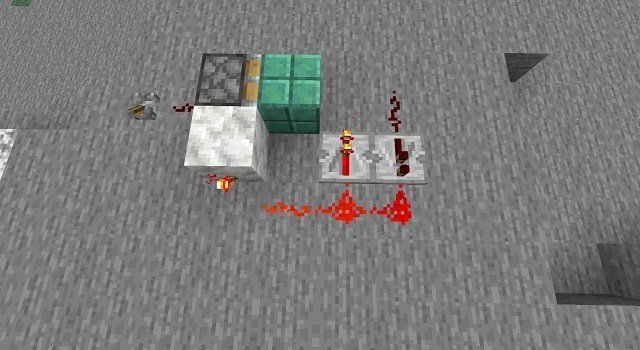
Almost every automated farm, item sorter and smelting array in Minecraft has the same heartbeat: a redstone clock, a small loop of components that pulses a signal on and off at a steady rhythm so the machine runs itself. There are dozens of ways to build one, and the right choice depends on how fast a pulse you need – a fraction of a second, or one dispenser shot every five minutes. These five designs cover the whole range, cheapest tricks first.
Quick Pick: Which Clock for Which Job?
| Design | Speed | Best for |
|---|---|---|
| Observer clock | Fastest possible, fixed pulse | Tiny rapid-fire circuits, dropper chains |
| Repeater loop | 2–8 ticks, extendable | General-purpose short delays |
| Comparator clock | Fast, 1-tick pulses | Compact builds, signal trickery |
| Hopper clock (Etho clock) | Seconds to minutes, item-count adjustable | Farms, auto-smelters, anything on a long timer |
| Minecart clock | Set by track length, wobbly | Novelty builds and long, loose timings |
One conversion to memorise: a game tick is 0.05 seconds, so 20 ticks make a second. Repeater delays are set in ticks – right-click a repeater to step it from 1 to 4 ticks.
1. The Observer Clock (Fastest and Smallest)
Place one observer on the ground, then place a second observer directly against it, face to face, so each is staring at the other. That is the entire build. Each observer sees the other change state and fires back, and the two settle into a permanent, rapid pulse. Tap the redstone output from the back of either observer. You cannot slow it down – that is the trade for a two-block clock.
2. The Repeater Loop (The Reliable Default)
- Place two repeaters side by side, facing opposite directions.
- Connect them into a closed loop with redstone dust: dust from the output of each repeater runs into the input of the other.
- To start it, put a lever beside the loop and flick it on and instantly off. The pulse you injected now chases itself around the loop forever.
The period is the two repeaters' delays added together – 2 ticks at minimum, 8 ticks with both set to 4. Want longer? Add more repeaters into the loop; the loop's period is simply the sum of all their delays. A sticky-piston variant, where a piston pushes a block in and out of the loop, gives you a proper on/off switch for machines you do not want running all day.
3. The Comparator Clock
Put a comparator down, right-click it into subtract mode (front torch lit), then run a line of redstone dust from its side input around to its output, and feed power into the back – a redstone torch beside it will do. The comparator keeps subtracting its own side signal, overshoots, resets and fires again, producing a very fast clock in a tiny footprint. It is the connoisseur's short-period clock and plays nicely with container-based signal strengths.
4. The Hopper Clock (For Real Timers)
The famous Etho design is what long delays are made of. Two hoppers face into each other; a comparator reads each hopper; the comparators control two sticky pistons that pass a single redstone block back and forth. Drop items into one hopper and they slowly drain into the other; when they run out, the redstone block swaps sides and the flow reverses. The half-period is set by how many items you load – roughly 0.8 seconds per item in the stack – so a handful of cobblestone gives you a pulse every few seconds and most of a stack stretches it to minutes. One output is on while the other is off, which makes it perfect for alternating machinery.
5. The Minecart Clock
Build a small rail loop (or a back-and-forth line with powered rails) that includes a detector rail, and send a minecart around it. Every pass over the detector rail emits a pulse. Lengthen the track to lengthen the period. It is charming and completely imprecise – minecarts slow down, get stuck, and despise being part of serious engineering – but for ambient builds and playful contraptions, nothing else has the same personality.
Stopping and Controlling Your Clocks
An always-on clock is a lag source and a noise machine, so give every clock an off switch: a lever that freezes a repeater, jams a piston into the hopper line, or cuts the comparator's power. Your farms will run when you want them to, and your base will stay quiet the rest of the time.
Frequently asked questions
What is the simplest redstone clock in Minecraft?
Two observers placed face to face. Each detects the other changing and they pulse each other forever – a working clock in two blocks, though its speed cannot be adjusted.
How do you make a redstone clock slower?
Raise the repeater delays (right-click, up to 4 ticks each) and add more repeaters to a repeater loop, or switch to a hopper clock and load more items – each extra item stretches the period.
How does a hopper clock work in Minecraft?
Items slowly transfer between two hoppers facing each other. Comparators watch the item counts and flip a redstone block between two sticky pistons when one side empties, so the transfer direction – and the output – keeps reversing on a timer set by the item count.
Why does my redstone torch clock burn out?
Torch-based clocks need at least a 3-tick delay in the loop. Shorter loops toggle the torch faster than it can recover and it burns out until the circuit is reset – add a repeater set to 3 or 4 ticks.
More Minecraft guides
 Redstone Components in Minecraft: A Complete GuideUpdated 12 November 2026
 Respiration Enchantment in Minecraft: Breathe Longer UnderwaterUpdated 12 November 2026
 What Does Smite Do in Minecraft? Smite Enchantment GuideUpdated 12 November 2026
 What Do Horses Eat in Minecraft? Every Food and Its EffectsUpdated 12 November 2026
 All Wolf Variants in Minecraft and Where to Find ThemUpdated 12 November 2026