Home › Minecraft › How to Make Circles and Spheres in Minecraft
How to Make Circles and Spheres in Minecraft
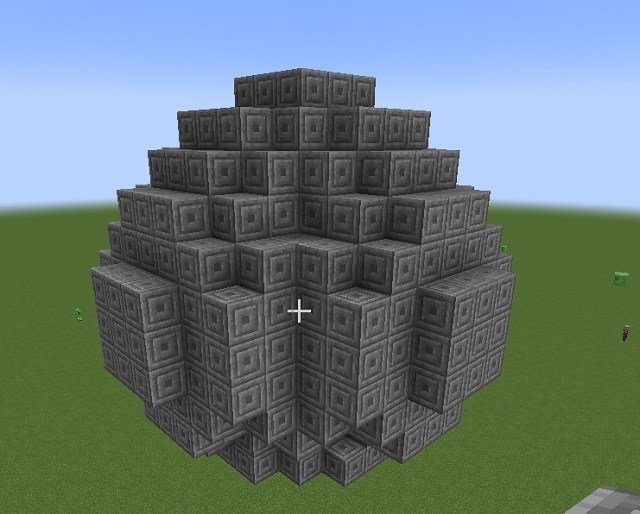
Minecraft is a game of cubes, which makes it an unlikely place to build a lighthouse, a dome or a planetarium. Yet round structures are everywhere in great builds, because the trick is not making blocks curve. It is arranging straight runs and little steps so that, from any sensible viewing distance, your eye reads the result as a circle. Once you understand the pattern, you can build one at any size without counting someone else's blueprint.
The basic idea
Every Minecraft circle has the same anatomy: four straight sides of equal length, one for each compass direction, joined by four identical corners. Each corner is a stair-step pattern, a few blocks one way, a few blocks the other, repeated in mirror image around the whole shape. The bigger the diameter, the longer the steps can be, and the smoother the circle looks. Small circles always look crunchy up close; step back twenty blocks and even a modest one reads perfectly round.
Building a circle by hand
- Choose an odd diameter so your circle has a single centre block; 18 across is a good first project. Mark the full width and depth with a cross of temporary blocks so you know the edges.
- Build the middle of each side as a straight run. On an 18-wide circle, each side's flat section is 5 blocks long, centred on the cross arms.
- Work one corner: from the end of a side, step out in a 2-across, 2-up pattern, then repeat it to reach the next side. That stepped diagonal replaces a curve.
- Mirror exactly what you did on the other three corners. Symmetry is doing all the work here; if one corner differs, the whole shape looks dented.
- Remove your guide cross and view it from a distance before judging it.
For scale, that 18 by 18 circle uses only about 52 blocks in its outline. An 8 by 8 starter circle needs roughly 24, with single-block steps at the corners. Keep a note of the side length and step pattern for each size you build, and you quickly develop a feel for new diameters without any reference at all.
From circles to spheres
A sphere is just a stack of circles. Build your widest circle at the middle height, then add slightly smaller circles above and below it, shrinking as you approach the top and bottom, and finish with a single block or small cap at each pole. A handy way to plan it is to sketch the vertical profile first: the sequence of diameters from bottom to top is the same curve as the circle itself, rotated. Hollow spheres make excellent domes and globes; leave the interior empty and light it well so hostile mobs do not move in.
Generators and WorldEdit
There is no shame in using help for big projects. Free online circle generators let you enter a width and height and show you the exact block layout, including whether the shape should be filled, thick or thin, which is invaluable at diameters of fifty or more. If you play with the WorldEdit mod, the job becomes one command: a sphere is generated instantly at your position, solid or hollow, in any block you name. Learn the hand method first, though. Towers get edited, domes get resized, and when a creeper takes a bite out of your observatory wall, you will be glad you know how the pattern fits back together.
Frequently asked questions
Can you make a perfect circle in Minecraft?
Not a true one, since everything is built from cubes. But straight sides joined by stepped corners look convincingly round from a distance, and the illusion gets better the larger the diameter.
How many blocks does a circle take?
An 8 by 8 outline uses about 24 blocks, while an 18 by 18 circle uses about 52 for its outline. Larger circles need proportionally more, and filled circles need far more than hollow outlines.
Should my circle's diameter be odd or even?
Odd diameters are easier for most builders because they give the circle a single centre block, which makes mirroring the four corners simple. Even diameters centre on a 2 by 2 point instead.
What is the fastest way to make a sphere?
With the WorldEdit mod, a single sphere command generates one instantly, hollow if you use the hollow flag. In vanilla, stack circles of shrinking diameter above and below a widest middle circle.
More Minecraft guides
 Redstone Components in Minecraft: A Complete GuideUpdated 12 November 2026
 Respiration Enchantment in Minecraft: Breathe Longer UnderwaterUpdated 12 November 2026
 What Does Smite Do in Minecraft? Smite Enchantment GuideUpdated 12 November 2026
 What Do Horses Eat in Minecraft? Every Food and Its EffectsUpdated 12 November 2026
 All Wolf Variants in Minecraft and Where to Find ThemUpdated 12 November 2026