Home › Minecraft › How to Install Minecraft Shaders with Iris or OptiFine
How to Install Minecraft Shaders with Iris or OptiFine
It's the same world, but the light is different. Shadows stretch across the grass, water reflects the sky, and torchlight actually feels warm. That's what a shader pack does to Minecraft, and installing one is a ten-minute job once you know the three steps: loader, pack, switch it on.
What You Need First
- Minecraft: Java Edition. Shaders do not work on Bedrock — this is a Java-only upgrade.
- A shader loader mod: either Iris or OptiFine. Vanilla Minecraft cannot run shader packs at all; the loader is what makes the Shaders menu exist.
- A reasonably capable graphics card. Light packs run on modest hardware, but cinematic packs are genuinely demanding.
Step 1: Install Iris or OptiFine
- Go to the official Iris or OptiFine download page.
- Download the version that matches your Minecraft version exactly — a 1.21 loader will not run a different game version.
- Run the downloaded .jar file (it opens with Java) and let it install into your .minecraft folder.
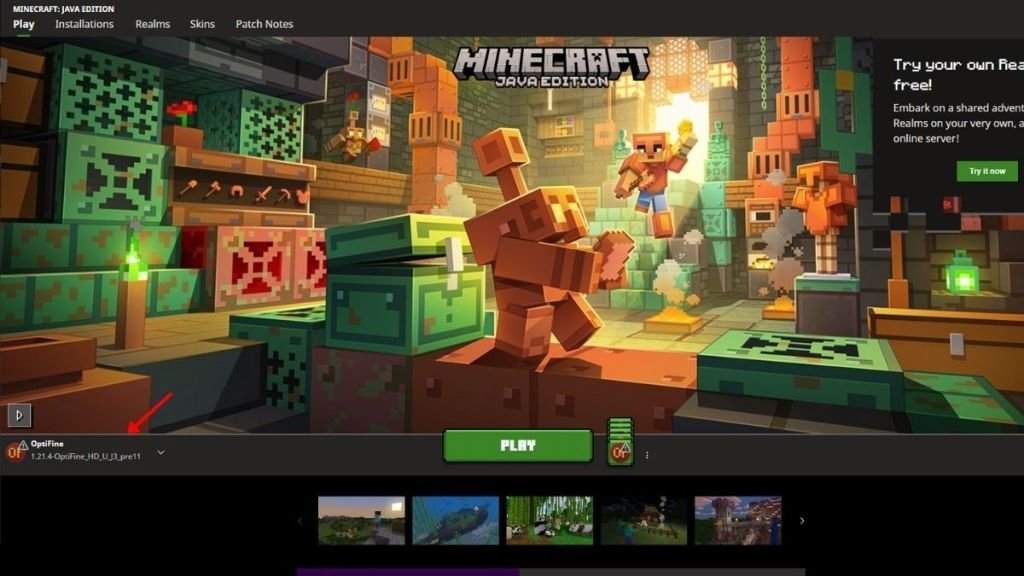
- Open the Minecraft Launcher — a new installation named after the mod will be waiting in the list.
Which should you choose? OptiFine is the long-standing all-in-one option with extra features like zoom. Iris is the modern favourite for performance, especially paired with Sodium. Both run the same shader packs.
Step 2: Download a Shader Pack
Get packs from trusted sources such as CurseForge or Modrinth — random download sites are how people end up with malware instead of graphics. Pick the pack, make sure its version fits your loader and game version, and download the .zip file. Keep it zipped; the game reads it that way, and unpacking it is the most common beginner mistake.
Step 3: Put the Pack In and Turn It On
- Launch Minecraft using the Iris or OptiFine profile.
- From the main menu, open Options, then Video Settings.
- Click the Shaders tab and choose Open Shaders Folder.
- Drag your downloaded zip into that folder, wait a few seconds, then close it.
- Click the pack's name in the list, then Apply or Done.
Load a world and the transformation is immediate — no restart needed. Fancy a test flight? Creative mode, an elytra, and a sunset will show you exactly what your PC just learned to do.
Performance Tips
Shaders always cost frames; the question is how many. If your game turns into a slideshow, drop to the pack's Lite or Medium profile (most packs include internal settings), lower your render distance a few chunks, and turn off the pack's most expensive extras like volumetric clouds. Integrated graphics should stick to the lightest packs available.
Choosing Your First Pack
If this is your first shader, resist the ultra-cinematic packs in the screenshots — they assume a high-end graphics card. Start with a well-known, scalable pack and run its Medium profile; packs in that class give you the soft shadows, waving grass and reflective water that make the biggest difference, without turning your world into a slideshow. Almost every popular pack includes internal settings menus (inside the Shaders screen), so once you're running, experiment one option at a time: shadows and water reflections are usually the two worth keeping even on weaker PCs, while volumetric lighting and ray-traced effects are the first things to switch off if frames dip.
Frequently asked questions
Do shaders work on Minecraft Bedrock?
No. Shader packs of this kind are Java Edition only, because they rely on loader mods like Iris and OptiFine that Bedrock doesn't support.
Do I need OptiFine to install shaders?
You need a loader, but it doesn't have to be OptiFine — Iris does the same job and is often better for performance. One of the two is required.
My shader pack isn't showing in the list. Why?
Usually one of three things: the zip was extracted (keep it zipped), it went into the wrong folder (use Open Shaders Folder from the game), or its version doesn't match your loader and game version.
Do shaders reduce FPS?
Yes, always to some degree. Most packs offer Lite and Medium profiles that keep most of the look with a much smaller performance hit.
More Minecraft guides
 Redstone Components in Minecraft: A Complete GuideUpdated 12 November 2026
 Respiration Enchantment in Minecraft: Breathe Longer UnderwaterUpdated 12 November 2026
 What Does Smite Do in Minecraft? Smite Enchantment GuideUpdated 12 November 2026
 What Do Horses Eat in Minecraft? Every Food and Its EffectsUpdated 12 November 2026
 All Wolf Variants in Minecraft and Where to Find ThemUpdated 12 November 2026