Home › Minecraft › How to Dye Leather Armor in Minecraft
How to Dye Leather Armor in Minecraft
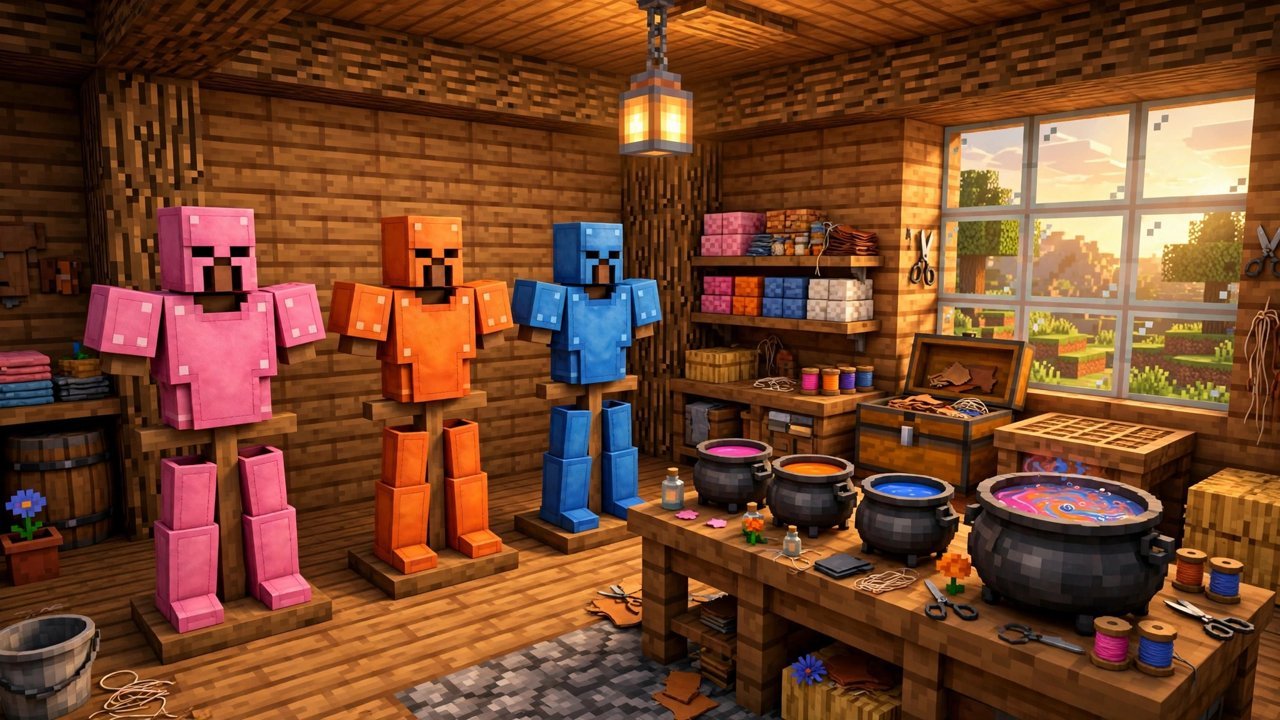
Leather armor will not save you from a creeper, and nobody pretends otherwise. What it does better than every other armor set in Minecraft is style: leather is the only armor material that accepts dye, and because colors blend rather than replace, the number of reachable shades runs into the millions. Whether you are color-coding a team on a server or just want a jacket that matches your base, here is how dyeing works on both editions — because Java and Bedrock do it quite differently.
What You Need
- Leather armor — any piece: cap, tunic, pants, or boots.
- Dyes — one or more, of any colors you want to blend.
- Java: a crafting table (or even your inventory grid).
- Bedrock: a cauldron and a bucket of water.
How to Dye Leather Armor on Java
The Java method happens entirely in a crafting grid. Place the leather armor piece in any slot, then add dye to any other slot. The preview in the result box updates instantly, showing the armor tinted with that color. Take the result out and the dye is applied.
Where it gets interesting is layering. Add a second dye — same color or a different one — and the result shifts. Stack several dyes around the armor and Java averages them into a new shade entirely. You can also feed an already-dyed piece back into the grid and keep adding color, nudging a muddy brown toward the exact tone you pictured. Nothing is permanent until you are happy, though every attempt does consume the dyes you put in.
How to Dye Leather Armor on Bedrock
Bedrock sends you to the cauldron instead. Place the cauldron, fill it with a water bucket, then hold a dye and use it on the cauldron — the water itself turns that color. Now hold the leather armor piece and use it on the dyed water, and the piece comes out colored.
The blending trick works here too, just one step removed: use additional dyes on the cauldron water to shift its color before dipping the armor. One filled cauldron holds enough water to dye three pieces before it runs dry and needs refilling, so plan your batch accordingly. Writing down your dye combinations is genuinely worth it if you find a shade you love, because recreating an exact custom color from memory is harder than it sounds.
How to Remove the Color
Changed your mind? Both editions share the same undo button. Fill a cauldron with plain, undyed water and use the colored armor piece on it. The color washes straight out, returning the piece to its original tan leather, ready to be dyed again from scratch. On Bedrock this uses up some of the cauldron's water just like dyeing does.
A Few Things Worth Knowing
Leather horse armor follows exactly the same rules as player armor on both editions, so your horse can match your outfit. Dyed pieces also accept armor trims on top of the color, giving you two layers of customization no other armor set can match. And since leather is cheap and cows are everywhere, the real cost of experimentation is the dyes — flowers, cocoa beans, lapis, and ink sacs — so build a small dye farm before going for the really exotic blends.
Frequently asked questions
How many times can you dye leather armor?
As many times as you like. Each round of dyeing adjusts the color further, though it consumes fresh dyes every time, so experimenting gets expensive in dye rather than in armor.
Can you dye leather horse armor the same way?
Yes. Leather horse armor uses the identical process — crafting grid with dyes on Java, dyed cauldron water on Bedrock.
How do you remove dye from leather armor?
Use the armor piece on a cauldron filled with plain water. The color washes out completely on both editions, returning the piece to its natural leather color.
Why does Bedrock use a cauldron instead of a crafting grid?
Bedrock simply implements dyeing differently: the dye colors the cauldron water first, and the armor picks the color up from the water. One cauldron of dyed water colors three pieces before running out.
More Minecraft guides
 Woodland Mansion in Minecraft: How to Find and Loot OneUpdated 12 November 2026
 Mineshafts in Minecraft: Loot, Cave Spiders and How to Find OneUpdated 12 November 2026
 Redstone Components in Minecraft: A Complete GuideUpdated 12 November 2026
 What Does Smite Do in Minecraft? Smite Enchantment GuideUpdated 12 November 2026
 All Wolf Variants in Minecraft and Where to Find ThemUpdated 12 November 2026