Home › Minecraft › 15 Useful Minecraft Commands You Should Be Using
15 Useful Minecraft Commands You Should Be Using
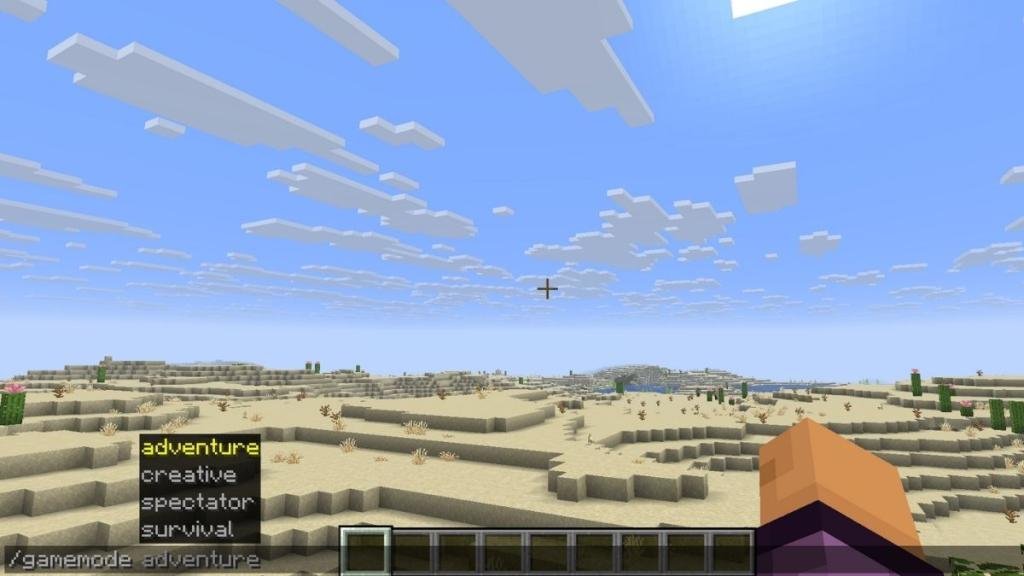
Commands are Minecraft's built-in cheat codes, and calling them cheats honestly undersells them. They teleport you across the world, hand you any item, copy entire buildings and rewrite the rules your world runs on. There are well over a hundred of them, but a small core set does almost all of the useful work. Here are the fifteen worth memorising.
Before You Start: Enabling Commands
Commands only work when cheats are allowed. In a new Java world, switch "Allow Cheats" on during world creation; in an existing world, open to LAN and enable cheats from there. On Bedrock, toggle "Activate Cheats" in the world settings — note that this disables achievements for that world. Once enabled, press T, type the command starting with a slash, and hit enter. Many commands also accept target selectors: @s targets yourself, @p the nearest player, @a all players, @r a random player and @e every entity.
The 15 Most Useful Minecraft Commands
| Command | What it does | Example |
|---|---|---|
| /tp | Teleport a player or entity anywhere | /tp @s 112 14 423 |
| /gamemode | Switch between survival, creative, spectator and adventure | /gamemode creative |
| /summon | Spawn any mob, vehicle or entity — even a giant | /summon minecraft:warden |
| /locate | Get coordinates for any structure, biome or point of interest | /locate structure minecraft:ancient_city |
| /time | Set, add to or query the world time | /time set day |
| /gamerule | Change world rules like tick speed or keeping inventory | /gamerule randomTickSpeed 233 |
| /fill | Fill a whole region with a block at once | /fill 11 23 34 ~ ~ ~ minecraft:sculk |
| /kill | Instantly kill a player or entity (loot and XP still drop) | /kill @e[type=creeper] |
| /give | Put any item, in any quantity, into an inventory | /give @s minecraft:apple 999 |
| /clone | Copy a region of blocks to another location | /clone 123 21 322 122 25 325 453 664 665 |
| /enchant | Apply enchantments, sometimes beyond normal limits | /enchant @s sharpness 2 |
| /fillbiome | Replace the biome of a region without changing its blocks | /fillbiome 123 44 231 122 54 234 minecraft:plains |
| /camerashake | Add an earthquake-style screen shake (Bedrock) | /camerashake @s 0.25 5 positional |
| /music | Play, queue or stop music tracks on demand (Bedrock) | /music play record.cat 1 0 loop |
| /help | Look up any other command's syntax in-game | /help teleport |
The Ones You Will Use Constantly
/tp and /locate are a pair. Locate hands you the coordinates of the nearest ancient city, mansion or stronghold; teleport takes you there in a second. Together they remove hours of blind exploring when you are testing a world or running a server.
/fill is the builder's best friend. It places thousands of blocks in one go — walls, floors, hollow shells, even regions of air to carve out caves. Its partner /clone duplicates finished work, so one perfect house becomes a street of them.
/gamerule quietly fixes annoyances. Setting keepInventory to true ends the graveyard run after a silly death, while randomTickSpeed controls how fast crops grow and leaves decay. Read the rule list carefully, though — some changes are effectively permanent for that world.
/give and /enchant handle gear. Give can produce items creative mode hides, like command blocks, and any stack size you ask for. Enchant skips the enchanting table's randomness and can push some enchantments past their survival caps.
Start with the teleport-and-locate combo and the fill command; they cover the majority of everyday needs. The rest are there when a build, a server event or a stubborn Warden demands them.
Frequently asked questions
What are the most useful Minecraft commands overall?
For most players: /tp for travel, /locate for finding structures, /gamemode for switching modes, /give for items and /fill for building. Those five cover the majority of everyday situations.
What do @a, @e, @p, @r and @s mean in commands?
They are target selectors: @a targets all players, @e all entities, @p the nearest player, @r a random player and @s yourself — the player or command block running the command.
What is the best Minecraft command for building?
/fill. It fills an entire cuboid region with any block in a single command, which makes walls, floors, platforms and terraforming dramatically faster than placing blocks by hand.
How do I use the /give command?
The syntax is /give <target> <item> <amount> — for example, /give @s minecraft:diamond 64 gives you a full stack of diamonds, provided cheats are enabled.
More Minecraft guides
 Woodland Mansion in Minecraft: How to Find and Loot OneUpdated 12 November 2026
 Mineshafts in Minecraft: Loot, Cave Spiders and How to Find OneUpdated 12 November 2026
 Redstone Components in Minecraft: A Complete GuideUpdated 12 November 2026
 What Does Smite Do in Minecraft? Smite Enchantment GuideUpdated 12 November 2026
 All Wolf Variants in Minecraft and Where to Find ThemUpdated 12 November 2026