Home › Minecraft › How to Use the Place Command in Minecraft (Feature, Structure, Jigsaw, Template)
How to Use the Place Command in Minecraft (Feature, Structure, Jigsaw, Template)
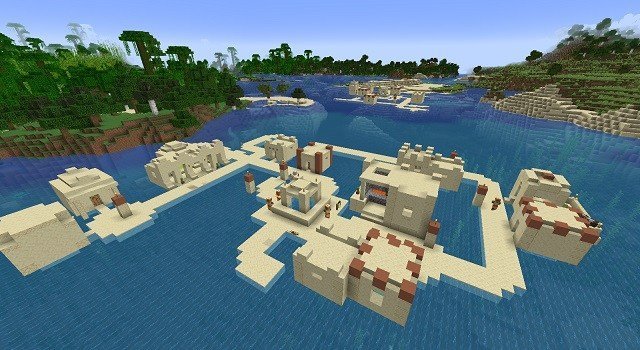
Exploration is half of Minecraft, but sometimes you want the world to come to you. The /place command, which replaced the old /placefeature in version 1.19, lets you generate natural features and entire structures at will: a village here, a mangrove there, an ancient city entrance floating over the ocean if you are feeling chaotic. It is one of the most powerful creative tools in the game, and also one of the easiest to break a world with. Here are all four of its modes and how each behaves.
Before You Start
You need cheats enabled. In single-player, open the world to LAN with Allow Cheats switched on if your world was created without them. Also, take the map maker's golden rule seriously: back up your world before heavy experimentation, because large jigsaw generations can bloat or even crash a save.
Place Feature: Grow Nature on Demand
/place feature <feature> generates a natural feature at your position. Features are the small building blocks of world generation: trees, ore veins, coral, plants and similar decorations. Try:
/place feature minecraft:mangrove
That grows a mangrove right where you stand. Features are picky about location, since they respect the conditions they need. An underwater plant will refuse to generate on dry land, and a tree needs valid ground. If a feature silently fails, the spot is usually wrong rather than the command.
Place Structure: Whole Buildings, One Command
/place structure <structure> generates a complete structure, for example:
/place structure minecraft:village_snowy
Structures keep their own placement logic, which makes the results respectable but sometimes surreal. You cannot drop a desert pyramid in the middle of the ocean, because the structure checks for valid terrain, yet a desert village generated in the sea passes its checks and looks gloriously wrong. For testing seed content, previewing a build location or bringing a bastion to your doorstep, this is the mode you will use most.
Place Jigsaw: Assemble Structures Piece by Piece
Big generated structures are not single models; they are assembled from jigsaw blocks connecting pools of pieces. The jigsaw mode plugs you directly into that machinery:
/place jigsaw <pool> <anchor> <depth>
For example, /place jigsaw minecraft:village/snowy/streets bottom 7 grows snowy village streets outward from the anchor piece. Unlike features and structures, jigsaw placement ignores biome compatibility completely, so pieces land wherever you point them. Two practical warnings: the anchor name comes from the structure's internal data and does not autocomplete, so you may need to look names up, and the depth value runs from 1 to 7, with 7 generating the full extent of connected pieces. This is the mode most likely to overwhelm a world, so save the experiments for a copy of your save.
Place Template: The Friendly Jigsaw
/place template <template> places a single ready-made structure piece, such as:
/place template minecraft:ancient_city/city/entrance/entrance_path_5
Think of templates as jigsaw placement without the chain reaction. A template is a finished chunk of a structure, it ignores placement compatibility, and it can be set down anywhere, including hanging in the sky, which makes it perfect for floating bases, custom ruins and hand-assembled megastructures. If jigsaw is a box of parts assembling themselves, template is placing one part exactly where your cursor says.
Frequently asked questions
What replaced the /placefeature command in Minecraft?
The /place command, added in Java Edition 1.19. It absorbed /placefeature as its feature mode and added structure, jigsaw and template modes on top.
Why did my /place feature command do nothing?
Features must suit their location. A mangrove needs swampy ground and water plants need water, so a feature that cannot grow at your position simply fails without an error. Move to valid terrain and try again.
Can /place put a structure anywhere?
The structure mode still respects each structure's placement logic, so a desert pyramid will not generate in the ocean. Jigsaw and template modes ignore compatibility entirely and can place pieces anywhere, even in mid-air.
What does the depth number in /place jigsaw mean?
Depth controls how far the jigsaw generation spreads from the anchor piece, from 1 up to 7. At 7 you get the structure's full connected extent, which can be very large, so back up your world first.
More Minecraft guides
 What Do Llamas Eat in Minecraft? Wheat and Hay Bales ExplainedUpdated 12 November 2026
 What Do Pigs Eat in Minecraft? (Breeding Food Guide)Updated 12 November 2026
 What Do Polar Bears Eat in Minecraft? (The Honest Answer)Updated 12 November 2026
 What Do Horses Eat in Minecraft? Every Food and Its EffectsUpdated 12 November 2026
 All Wolf Variants in Minecraft and Where to Find ThemUpdated 12 November 2026