Home › Minecraft › How to Make Your Own Minecraft Texture Pack
How to Make Your Own Minecraft Texture Pack
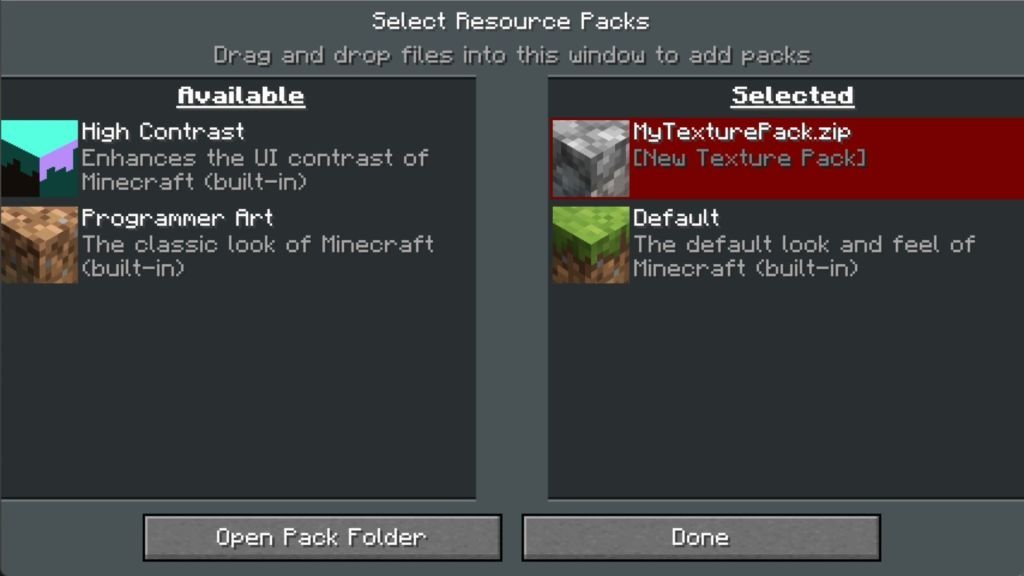
Downloaded texture packs only ever give you someone else's taste. Making your own pack hands you the whole game's appearance: every block, mob and item is just a small image file, and swapping those images is all a texture pack really is. You need no special software beyond an image editor and your file manager.
How Texture Packs Work
Each in-game texture is a tiny picture wrapped onto cubes and models. The default resolution is 16x16 pixels, which is why Minecraft looks the way it does. You can paint at higher resolutions such as 32x32 or even 128x128, but very high resolutions can strain weaker devices, so most creators stick to 16x16 or 32x32.
Tools That Make It Easier
If editing raw folders sounds tedious, online creators help. Nova Skin's resource pack creator presents every texture in a folder tree with a built-in paint editor, and can also change fonts, music and particles before you download the finished pack. On Android, the AddOns Maker app offers a similar built-in editor for Bedrock packs. The manual method below, though, works offline and teaches you exactly what a pack contains.
Making a Pack on Java Edition
- Open the game folder at %appdata%\.minecraft and go into the versions folder, then the folder for your current game version.
- Copy the .jar file you find there into a new, empty folder.
- Rename the copy's extension from .jar to .zip and extract it.
- Inside, navigate to assets, then minecraft, then textures. Subfolders split the art into categories: block, entity (mobs and animals), item, environment and more.
- Open any PNG in Paint or another editor, repaint it, and save it with the same name in the same place. Repeat for every texture you want to change.
The pack.mcmeta File
Back in the pack's root folder (next to assets), create a text file named pack.mcmeta containing a pack section with a pack_format number and a description. The format number must match your game version, or the game will warn the pack is incompatible:
| pack_format | Game version |
|---|---|
| 15 | 1.20 - 1.20.1 |
| 34 | 1.21 |
| 48 | 1.21 - 1.21.1 |
| 57 | 1.21.2 - 1.21.3 |
Avoid special symbols in the description text to keep the file valid.
Packing and Installing (Java)
Select the assets folder and pack.mcmeta together and compress them into a single zip. Move that zip into the resourcepacks folder inside .minecraft. Then launch the game, open Options, choose Resource Packs, and click your pack to move it into the active column. Load a world and check your edited blocks, items and mobs in place.
Making a Pack on Bedrock Edition
Bedrock game files are locked down, so instead you download Mojang's official vanilla resource pack template and edit that. The texture editing itself is identical: open the PNGs (or TGA files, using an editor like GIMP or Photoshop) and save over them with the same names. The difference is the manifest: Bedrock packs use a manifest.json file whose header and module sections each need a unique UUID, which free online UUID generators will create for you. Finally, zip the pack's contents, rename the file extension from .zip to .mcpack, and open it; Minecraft imports the pack, after which you activate it under Settings and Global Resources.
Finishing Advice
Start small: recolour one mob or a handful of blocks, test it, then grow the pack. Keeping the default file names and folder structure untouched is the whole secret; if a texture does not change in game, a renamed file or a misplaced folder is almost always the cause.
Frequently asked questions
What size are Minecraft textures?
The default texture resolution is 16x16 pixels. Packs can use 32x32 or higher, up to 128x128, but higher resolutions may not run well on every device.
What is pack_format and why does it matter?
pack_format is a number in pack.mcmeta that tells the game which version the pack was made for. If it does not match your game version closely enough, Minecraft flags the pack as incompatible.
Do I need special software to make a texture pack?
No. For Java you need only a zip tool, a text editor and a basic image editor like Paint. Online tools such as Nova Skin's creator are optional conveniences.
How do Bedrock packs differ from Java packs?
Bedrock packs use a manifest.json with two UUIDs instead of pack.mcmeta, start from the official vanilla resource pack template, and are shared as .mcpack files that import when opened.
More Minecraft guides
 Respiration Enchantment in Minecraft: Breathe Longer UnderwaterUpdated 12 November 2026
 Sea Pickles in Minecraft: How to Get, Farm and Use ThemUpdated 12 November 2026
 What Does Smite Do in Minecraft? Smite Enchantment GuideUpdated 12 November 2026
 What Do Horses Eat in Minecraft? Every Food and Its EffectsUpdated 12 November 2026
 All Wolf Variants in Minecraft and Where to Find ThemUpdated 12 November 2026