Home › Minecraft › How to Make a Map in Minecraft
How to Make a Map in Minecraft
Minecraft worlds are effectively endless, they have no minimap, and everything starts to look the same after your third forest. A hand-held map is the game's built-in answer to getting lost, and once you learn to make and upgrade one, long exploration trips become far less stressful.
What You Need
A finished map needs two components: one compass and eight paper. Working backwards, that means gathering nine sugar cane, four iron ingots and one piece of redstone dust.
Making Paper
Sugar cane grows on grass, dirt and sand right next to water, most often in swamps, deserts and riverbanks. Place three canes in a horizontal row in a crafting grid and you get three paper. You need nine canes total to reach eight paper, with one sheet left over.
Making a Compass
Smelt iron ore into ingots, and dig deep enough to find redstone, which generates in the lower layers of the world, commonly near lava. Put the redstone dust in the center of the grid and an iron ingot on each of its four sides, leaving the corners empty. That cross shape gives you the compass.
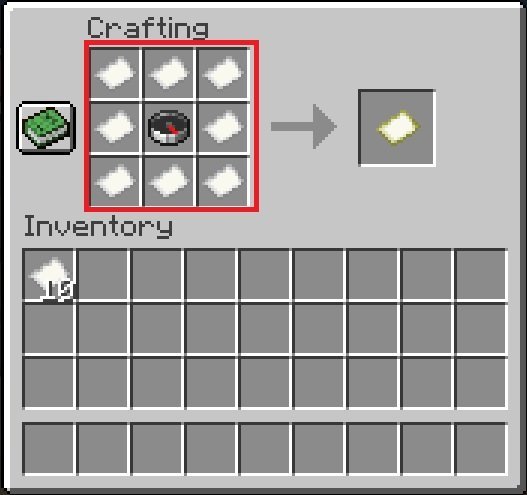
Crafting the Map
- Open a crafting table.
- Place the compass in the exact center slot.
- Fill all eight remaining slots with paper.
- Take the empty map from the output slot.
On Bedrock edition you can technically leave out the compass and still get a map, but it will not show your position marker, which defeats most of the point. Spend the iron.
Using Your Map
Hold the empty map and use it once. It activates, takes the name of its zoom level, and begins filling in the terrain you walk across. A white pointer marks your position and rotates as you turn. Holding the map in your off-hand (the F key swaps it there on Java) keeps it visible in the corner of your screen while your main hand stays free for tools.
One freshly made map only covers a small area, 128 by 128 blocks. For any serious journey you will want to zoom it out.
Expanding the Map
Surround an existing map with eight more paper on a crafting table and it zooms out one level, covering four times the area at less detail. You can repeat this four times in total, and a fully expanded map covers 2,048 by 2,048 blocks. The catch: zooming out wipes the drawn detail, and the new, larger map only fills in as you revisit the terrain.
A cartography table, crafted from two paper and four planks, does the same job far more cheaply: expanding costs a single sheet of paper there, and it can also clone a map with one extra empty map, or lock a map with a glass pane so it stops updating.
Marking Locations
Maps become genuinely powerful once you add markers. Place a banner (six wool of one color over a stick) at your base, a village or a monument, then use a held map on the banner. A marker in the banner's color appears on the map at that spot. Name the banner on an anvil before placing it, and the name shows on the map too. A wall of labeled markers is the closest thing Minecraft has to a proper atlas, and it is well worth the wool.
Frequently asked questions
How do you make a map in Minecraft without a compass?
On Bedrock edition, fill the crafting grid with eight paper and leave the center empty. The map works, but it has no player position marker, so a compass version is strongly recommended.
How many times can you expand a Minecraft map?
Four times. Each expansion multiplies the covered area by four, from 128x128 blocks at the smallest zoom up to 2,048x2,048 blocks at the largest.
How do you put markers on a Minecraft map?
Place a banner where you want the marker, then use the map on the banner. Naming the banner with an anvil first makes the name appear on the map as well.
Is a cartography table better for maps than a crafting table?
Yes for map work. Expanding a map costs eight paper on a crafting table but only one paper on a cartography table, which can also copy and lock maps.
More Minecraft guides
 How to Make a Villager Breeder in MinecraftUpdated 12 November 2026
 How to Tame a Horse in MinecraftUpdated 12 November 2026
 How to Tame a Wolf in MinecraftUpdated 12 November 2026
 How to Make an Iron Farm in MinecraftUpdated 12 November 2026
 Minecraft Brewing Guide: All Potion RecipesUpdated 12 November 2026