Home › Minecraft › How to Download and Install Minecraft Maps (Java, Bedrock & Mobile)
How to Download and Install Minecraft Maps (Java, Bedrock & Mobile)
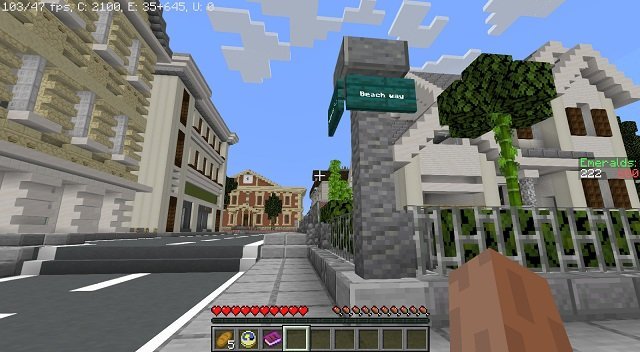
A Minecraft map is just a saved world that someone else built and shared: adventure maps, full cities, parkour courses and scale models of real places. Installing one takes a couple of minutes once you know where your game keeps its saves. The method differs between editions, so find yours below.
What Exactly Is a Minecraft Map?
Every time you play, your world is stored as a folder of files in the game's directory. Export that folder and anyone can load the same world, builds and all. Those shared save files are what the community calls maps, and most are free. Note that Java maps travel as .zip files while Bedrock maps use .mcworld or .mctemplate files, and the two formats are not interchangeable.
Where to Download Maps
Stick to established community sites: MinecraftMaps and Planet Minecraft are the main sources for Java, while MCPEDL is the go-to for Bedrock. The official Marketplace inside Bedrock also sells professionally made maps. Always check the map's page for the game version it was made for, since that avoids most compatibility surprises.
Installing a Map on Java Edition
- Download the map and confirm it is a .zip file.
- Extract it (right-click and choose Extract All on Windows, or double-click on a Mac) and open the extracted folder. The folder you want contains the world's files directly, including a level.dat file.
- Open your saves folder. On Windows, press Win + R and enter %appdata%\.minecraft\saves. On a Mac, look in ~/Library/Application Support/minecraft/saves.
- Paste the map folder into saves.
- Launch Minecraft, choose Singleplayer, and the map will be in your world list. Select it and press Play Selected World.
Installing a Map on Bedrock (PC and Console)
Bedrock is simpler. Download the .mcworld file, then double-click it. Minecraft launches and imports the world automatically; heavy worlds can sit on the loading screen for a while, which is normal. Afterwards the map appears in your worlds list like any other save.
Installing a Map on Mobile (Android and iOS)
Download the .mcworld file directly on your device. On Android, open it from your file manager and choose Minecraft when asked. On iPhone and iPad, use the share option on the file and pick Copy to Minecraft; the game opens with the map imported.
Playing and Removing Maps
Installed maps load from the Singleplayer menu in both editions. Expect slightly longer loading times than a fresh world, and be aware that editing and saving a downloaded map changes your copy of it, so keep the original download if you might want a clean restart. To delete a map, select it in the world list and use the Delete button, or remove its folder from saves directly.
Version Compatibility
Most maps still run on newer game versions than the one they were built for, though a feature may occasionally misbehave or a stocked chest may end up empty. Running a map on an older version than it was made for is much riskier. Converting Java maps to Bedrock (or the reverse) is possible with third-party tools but unreliable, so downloading the correct edition's version is always the safer route.
Frequently asked questions
Are Minecraft maps free?
Most community maps are completely free to download from sites like MinecraftMaps, Planet Minecraft and MCPEDL. The Bedrock Marketplace also sells paid, professionally made maps.
Can I use a Java map on Bedrock?
Not directly. Java maps are zip-packaged world folders, while Bedrock uses .mcworld files. Conversion tools exist but are unreliable, so download the version made for your edition.
Where is the Minecraft saves folder?
On Windows it is %appdata%\.minecraft\saves. On a Mac, it is ~/Library/Application Support/minecraft/saves.
How do I share my own world as a map?
On Java, compress your world's folder from the saves directory into a .zip file. Anyone can then extract it into their own saves folder and play it.
More Minecraft guides
 Respiration Enchantment in Minecraft: Breathe Longer UnderwaterUpdated 12 November 2026
 Sea Pickles in Minecraft: How to Get, Farm and Use ThemUpdated 12 November 2026
 What Does Smite Do in Minecraft? Smite Enchantment GuideUpdated 12 November 2026
 What Do Horses Eat in Minecraft? Every Food and Its EffectsUpdated 12 November 2026
 All Wolf Variants in Minecraft and Where to Find ThemUpdated 12 November 2026