Home › Minecraft › How to Customize Armor in Minecraft: Trims and Dyes Explained
How to Customize Armor in Minecraft: Trims and Dyes Explained
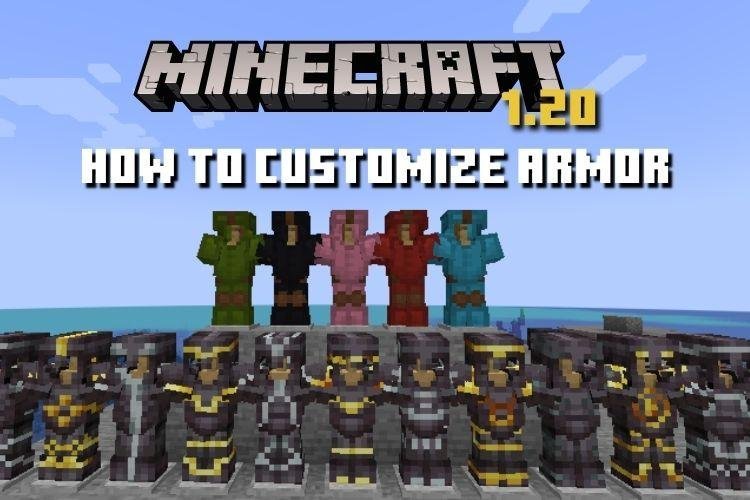
For most of Minecraft's life, two players in diamond armor looked identical. That ended with armor trims. Between the trim patterns, the materials that colour them, and dyeable leather, a full set can now be combined in millions of ways — and none of it costs you a single point of protection. Here is how both customization systems work, and how they stack together.
System One: Armor Trims (Any Armor)
Trims are patterns applied at a smithing table using three ingredients:
- A smithing template — the pattern. There are 18 of them (Sentry, Wild, Coast, Silence, Bolt, Flow and more), each found in a different structure's chests: Silence hides in Ancient Cities, Bolt and Flow in trial chambers, Ward in woodland mansions, and so on.
- The armor piece — helmet, chestplate, leggings or boots, of any material including netherite.
- A trim material — the colour: iron, copper, gold, lapis, redstone, emerald, diamond, netherite, amethyst, quartz, or resin for a molten orange.
Place the template in the left slot of the smithing table, the armor in the middle, and the material on the right. Done — the pattern is drawn over the armor in your material's colour. One practical tip: trimming a piece with its own material (gold trim on a gold chestplate) is allowed, but the pattern renders in a darker shade of the same colour and can be hard to see — most players pick a contrasting material instead.
Templates are precious, so duplicate them before use: a template plus 7 diamonds plus one block related to where it was found (cobbled deepslate for Silence, for example) crafts a copy at the smithing table.
System Two: Dyeing (Leather Armor Only)
Leather is the weakest armor in the game and the most expressive. Every piece can be dyed in any of the 16 dye colours — and beyond, because dyes blend.
On Java Edition
Put the leather piece and one or more dyes together in a crafting grid, in any slots. Adding multiple different dyes mixes a custom colour, and dyeing an already-dyed piece with another dye shifts its shade. The possible colour space runs into the millions.
On Bedrock Edition
Bedrock uses a cauldron instead. Fill it with a water bucket, use a dye on the water to tint it, then use the leather piece on the cauldron to dye it. Each dip uses some of the dyed water, so one dye can colour several pieces — the more economical method, and you can also wash a piece back to plain leather using a cauldron of clean water.
Combining Both Systems
Here is the part many players miss: the systems stack. Dye a leather set any colour you like, then run each piece through the smithing table with a template and a contrasting material. A deep purple tunic with a gold Tide pattern is exactly the kind of thing the system was built for. Trimming also works on already-enchanted armor and never removes enchantments.
What Customization Does Not Do
Trims and dyes are 100% cosmetic. They change no stats, no durability, no enchantability. The only in-game feedback is the subtle enchantment glint, which is separate. So customize freely — the shy-looking set and the parade-ground set protect you exactly the same. In multiplayer, though, never underestimate the value of being the one player everyone recognises from across the battlefield.
Frequently asked questions
How many armor trim patterns are there in Minecraft?
There are 18 trim templates, each found in a different structure — from Sentry in pillager outposts to Silence in Ancient Cities and Bolt and Flow in trial chambers. Each can be applied in 11 different trim materials.
Can you dye diamond or netherite armor?
No. Dyeing is exclusive to leather armor. Diamond, netherite, iron, gold and chainmail can only be customized with trims — though leather can take both dye and a trim at once.
Does trimming armor remove its enchantments?
No. Trimming is done at a smithing table and leaves enchantments, durability and stats completely untouched — it only changes the appearance.
How do you duplicate an armor trim template?
At a smithing table, combine the template with 7 diamonds and one thematically-linked block (for example, cobbled deepslate for the Silence trim) to craft a copy. Always duplicate rare templates before using them.
More Minecraft guides
 When Did Minecraft Come Out? Full Release TimelineUpdated 12 November 2026
 Where to Find Frogs in Minecraft: All Three VariantsUpdated 12 November 2026
 6 Best Uses of Wind Charge in MinecraftUpdated 12 November 2026
 6 Best Uses of Wither Roses in MinecraftUpdated 12 November 2026
 All Wolf Variants in Minecraft and Where to Find ThemUpdated 12 November 2026