Home › Minecraft › How to Change Biomes in Minecraft With the Fillbiome Command
How to Change Biomes in Minecraft With the Fillbiome Command
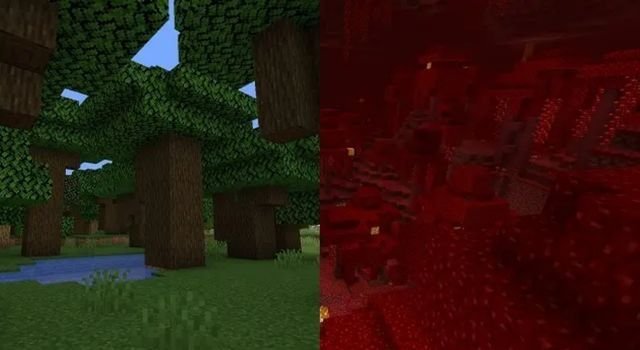
Biomes decide far more than scenery. They set the colour of the sky, fog, water and grass, the ambient sounds you hear, and which mobs can spawn around you. Normally you take the biome the world gives you, but Java players have a scalpel for it: the /fillbiome command, added in 1.20, rewrites the biome of any region you choose while leaving every block exactly where it stands. Want snow-free plains around your base or the red glow of a crimson forest in the Overworld? This is the tool.
Fillbiome Command Syntax
The basic form takes two corner coordinates and a biome:
/fillbiome <from-x y z> <to-x y z> <biome>
Two real examples show how flexible it is. This first one uses relative coordinates (the tildes) to convert the ground around you into savanna:
/fillbiome ~ ~ ~ ~10 ~-10 ~40 minecraft:savanna
And this one uses fixed coordinates to turn a specific patch of the world into plains:
/fillbiome -150 71 936 -122 78 946 minecraft:plains
You need cheats enabled. In a single-player world without them, pause the game, choose Open to LAN, switch Allow Cheats on, and start the LAN world to unlock commands for the session.
What Changing a Biome Actually Does
This is the part players get wrong: fillbiome does not transform blocks. Desert sand stays sand, plains grass stays plains grass, and no trees appear or vanish. What changes is the biome layer wrapped around them:
- Atmosphere: fog colour, sky tint, water colour, grass and leaf shades, plus biome ambient sounds and music.
- Spawning rules: biome-specific mobs follow the new biome. Convert a patch to mushroom fields and hostile mobs stop spawning there, because mushroom fields forbid them.
- Resource quirks: biome-linked generation traits apply, like the badlands having the richest gold generation or the End highlands spawning only endermen.
So the classic use cases are cosmetic mood-setting, mob-proofing an area without lighting it up, and fixing an ugly biome border next to a carefully planned build.
Using the Replace Filter
By default, fillbiome converts every biome inside your box, which is a blunt instrument. Add the replace argument with a biome tag to convert only matching biomes:
/fillbiome -150 71 936 -122 78 946 minecraft:badlands replace #minecraft:is_forest
That turns only forest-type biomes in the box into badlands and leaves everything else untouched. Tags can also target structure-based biome groups, such as the savanna village tag. It is the difference between repainting a whole room and touching up one wall.
Tips for Clean Results
- Press F3 and note both corners carefully before typing; a transposed coordinate converts the wrong hillside.
- Give the box generous height. Biomes are stored in three dimensions and blend at the edges, so a flat, thin selection can look patchy from above.
- Back up the world first if the area matters. There is no undo button for a biome.
One more creative use deserves a mention: biome conversion pairs beautifully with terraforming. Sculpt the terrain by hand or with other commands first, then repaint its biome so the grass, water and fog match the mood you built. A hand-made volcanic island reads completely differently once its biome layer stops insisting it is a beach.
Frequently asked questions
Does fillbiome change the blocks in an area?
No. It only changes the biome data: fog, sky, water and grass colour, ambient sounds and which mobs can spawn. Every block stays exactly as it was, so desert sand converted to plains still looks like sand.
Is fillbiome available on Bedrock?
No. The /fillbiome command is a Java Edition command, added in version 1.20. Bedrock players cannot change biomes with commands.
How do I use fillbiome without cheats enabled?
Open your world to LAN from the pause menu, turn Allow Cheats on, and start the LAN session. Commands, including fillbiome, then work until you leave the world.
What does the replace filter do in fillbiome?
It limits the conversion to areas that currently have a specific biome or biome tag. For example, adding replace #minecraft:is_forest converts only forest-type biomes inside your selected box.
More Minecraft guides
 What Do Llamas Eat in Minecraft? Wheat and Hay Bales ExplainedUpdated 12 November 2026
 What Do Pigs Eat in Minecraft? (Breeding Food Guide)Updated 12 November 2026
 What Do Polar Bears Eat in Minecraft? (The Honest Answer)Updated 12 November 2026
 What Do Horses Eat in Minecraft? Every Food and Its EffectsUpdated 12 November 2026
 All Wolf Variants in Minecraft and Where to Find ThemUpdated 12 November 2026