Home › Roblox Codes › Do Not Stop Codes (November 2026)
Do Not Stop Codes (November 2026)
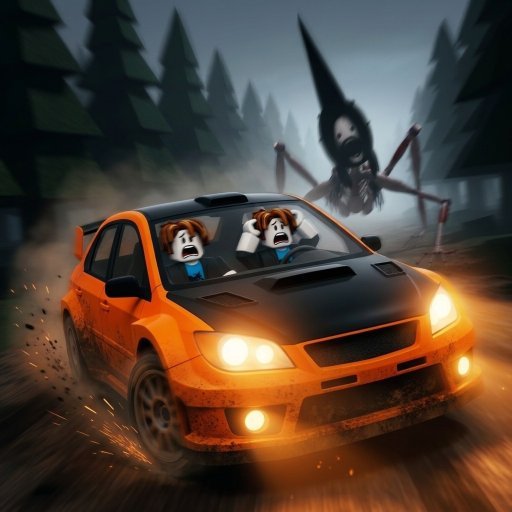
All working Do Not Stop codes
Click a code to copy it. Tried one? Tap Yes or No so other players know whether it still works.
| Code | Reward | Did it work? |
|---|---|---|
| 250 Credits | Thanks! | |
| 250 Credits | Thanks! | |
| 250 Credits | Thanks! | |
| 250 Credits | Thanks! | |
| 200 Credits | Thanks! | |
| 150 Credits | Thanks! |
Do Not Stop is a driving horror game with one rule that explains everything: keep the car moving. You are behind the wheel of a battered rally car on a dark road at night, and something tall is coming up behind you. Slow down for too long, coast, or stop altogether, and the thing the players call Steeple catches you. Reach the shelter at the end of the route and you survive; hesitate, and the run ends badly.
Each run starts in the lobby, where you step onto a pad, pick one of ten routes and set off alone or with a passenger. The two-player setup is where the game really shines: the driver wrestles the car through corners, drifting with the handbrake to keep momentum, while the passenger watches the radar and calls out what is coming. Routes range from the seven-mile Route 1610, the only one marked Easy and the best place to learn, up to monsters like the 17-mile Calliope Road added in Update 2. Every route you finish earns a Survived badge and a payout of Credits.
What Credits do in Do Not Stop
Credits are the game's only currency, and almost everything fun runs on them. In the Garage you can open crates for cosmetics that change how your car looks, and work through a roster of vehicles that runs from a humble Grade D starter up to Grade S machines. You earn Credits at the end of every run, finished or not, but the fastest lump sum a new player can get comes from codes. The developer prints them directly in the game's own description, which is why the list on this page can be checked there at any time.
How to redeem Do Not Stop codes
- Launch Do Not Stop on Roblox and wait in the lobby.
- Click Garage on the left side of the screen.
- Choose the Codes option.
- Type a code into the CODE box exactly as it is written.
- Hit REDEEM and the Credits land in your balance straight away.
One warning worth repeating: the codes on this page are for this game only. There is a separate Roblox game with a very similar name, and its codes will not work here. If a code fails, check you are in the right experience before assuming it has expired.
Tips for your first runs
- Learn on Route 1610. It is short and forgiving, and it teaches you how the car drifts before the longer routes start punishing mistakes.
- Momentum beats speed. A clean line through corners keeps you ahead of the entity; raw top speed into a wall does the opposite.
- Bring a passenger. A second pair of eyes on the radar makes night driving far less stressful, and runs pay out the same.
- Redeem codes before a big Garage session. The full set is worth 1,350 Credits, which covers your first crates without any grinding.
New codes tend to arrive with updates and events - the current set grew when Update 2 landed in mid-November - and the developer posts them in the game description and Discord first. None of the six codes have expired yet, but that will not last forever, so claim them while they are live.
Frequently asked questions
How many Do Not Stop codes are working right now?
Six. All six are printed in the game's own Roblox description, and Pro Game Guides and Destructoid list the same six as active, so the set is about as well verified as Roblox codes get.
Where do I redeem codes in Do Not Stop?
In the lobby, open the Garage on the left side of the screen, choose Codes, type the code into the CODE box and press REDEEM. The Credits are added to your balance immediately.
What should I spend my free Credits on?
Crates in the Garage are the obvious first stop, since they unlock cosmetics for your car. Save the rest toward a better vehicle once you know which routes you enjoy running.
Why did my Do Not Stop code not work?
The most common reason is being in the wrong game - a different Roblox experience has a very similar name and its own codes. Check the place name, copy the code exactly, and make sure you have not already redeemed it.
More Roblox codes worth a look
 Depth Incremental Codes (November 2026)Updated 17 November 2026
 Stand Out Codes (November 2026)Updated 17 November 2026
 Unscathed RNG Codes (November 2026)Updated 17 November 2026
 Anime Overseer Codes (November 2026)Updated 17 November 2026
 Missile Empire Codes (November 2026)Updated 17 November 2026