Home › Minecraft › 5 Best Ways to Use a Banner in Minecraft
5 Best Ways to Use a Banner in Minecraft
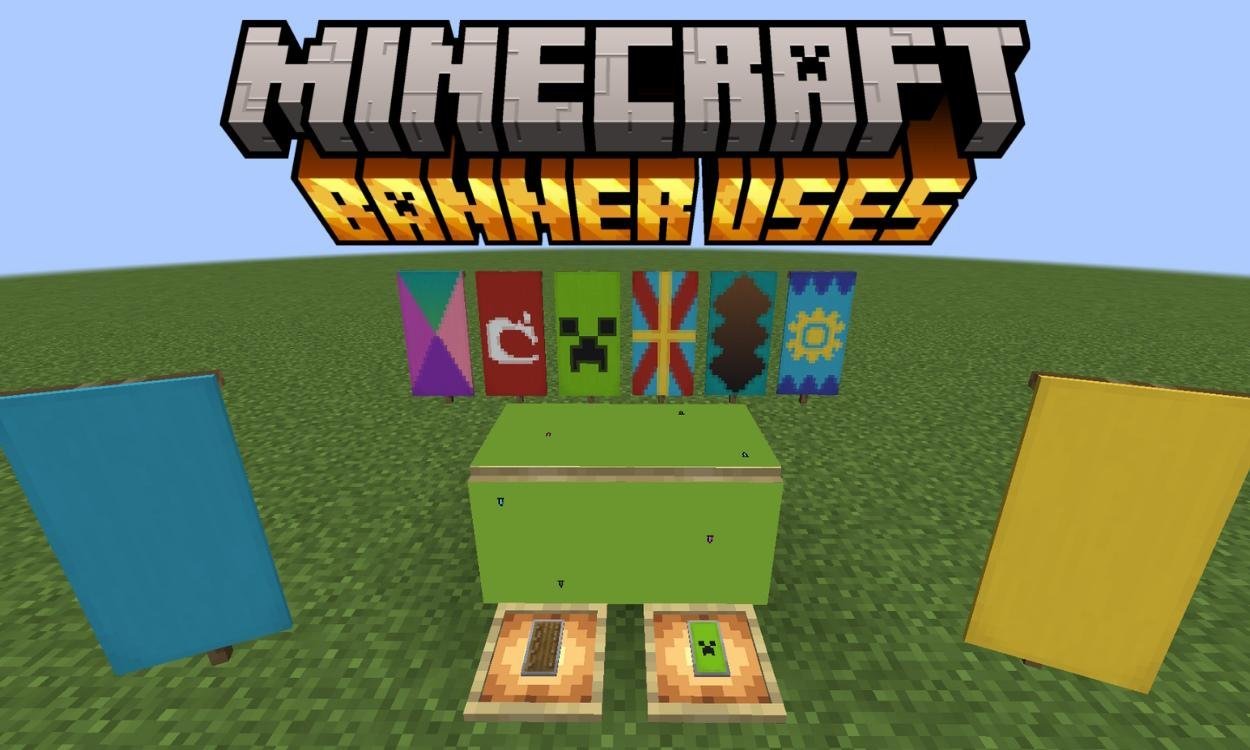
Plenty of players craft a banner once, hang it over their door, and forget the block exists. That is a shame, because the banner is quietly one of the most expressive items in Minecraft, a piece of cloth that can carry artwork, identify your faction and even annotate your maps. These five uses show what it can really do.
1. Design Layered Artwork at the Loom
Everything starts at the loom. Put a banner and a dye inside and you can apply stripes, borders, gradients and shapes, layer upon layer, in any of the sixteen dye colours. Then there are the special banner patterns, the rare designs that paint on things like a creeper face, a skull, a flower or a globe. Stack ordinary layers under a special pattern or two and the result stops looking like a flag and starts looking like pixel art: heraldic crests, clan sigils, shop signs and flags for nations that exist only in your world.
2. Decorate Like You Mean It
As a building block, the banner has three quiet superpowers. It waves gently as if in a breeze, it has no solid hitbox so you can walk straight through it, and it can overlap the space of other blocks when hung. Together those traits make banners perfect curtains across a window, tapestries behind a throne, table runners, shop awnings — and, sneakiest of all, secret passages, since a banner hanging over a gap hides the hole while letting you stroll through it.
3. Put Your Colours on a Shield
The most practical use on this list: combine a banner with a shield in a crafting grid and the banner's design transfers onto the shield's face. Suddenly your whole crew can march behind matching colours, your PvP opponents can learn to fear a particular crest, and that plain wooden shield you have carried since day one gets a personality. For multiplayer worlds and roleplay servers, it is the closest thing Minecraft has to a uniform.
4. Copy a Finished Design in Seconds
Good banner designs take time, and nobody wants to rebuild one layer by layer just to line both sides of a gate. You do not have to. Place a plain banner with the same base colour as your finished one into a crafting grid alongside it, and the design copies across wholesale. Make one masterpiece, then reproduce it for every tower, ship and shield in the fleet.
5. Mark Locations on Your Maps
The banner's sneakiest trick is cartographic. On Java Edition, hold a map and use it on a banner planted in the ground, and a marker appears on the map at the banner's position, drawn in the banner's base colour. Rename the banner on an anvil first and the name prints under the marker, turning your map into a labelled atlas of mines, villages and builds. Use the map on the banner again to remove the marker when a site is exhausted. In a game where navigation usually means staring at coordinates, a network of named flags feels almost luxurious.
Frequently asked questions
Can you wash a pattern off a banner?
Yes. Use the banner on a cauldron that contains water and the most recently applied pattern layer is removed, consuming one third of the cauldron's water. It only peels one layer at a time, working backwards through your design.
Do banner map markers work on Bedrock Edition?
No. Stamping a banner onto a map as a named marker is a Java Edition feature, so Bedrock players will need to rely on coordinates or lodestones instead.
How do you copy a banner design onto another banner?
Put the finished banner and a blank banner of the same base colour together in a crafting grid. The blank banner takes on the full design, and the original is not consumed.
Can any banner be placed on a shield?
Yes, any banner works, patterned or plain. Combine it with a shield in the crafting grid and the banner's design, colours and all, is applied to the shield's front.
More Minecraft guides
 What Do Horses Eat in Minecraft? Every Food and Its EffectsUpdated 12 November 2026
 When Did Minecraft Come Out? Full Release TimelineUpdated 12 November 2026
 6 Best Uses of Wind Charge in MinecraftUpdated 12 November 2026
 6 Best Uses of Wither Roses in MinecraftUpdated 12 November 2026
 All Wolf Variants in Minecraft and Where to Find ThemUpdated 12 November 2026